




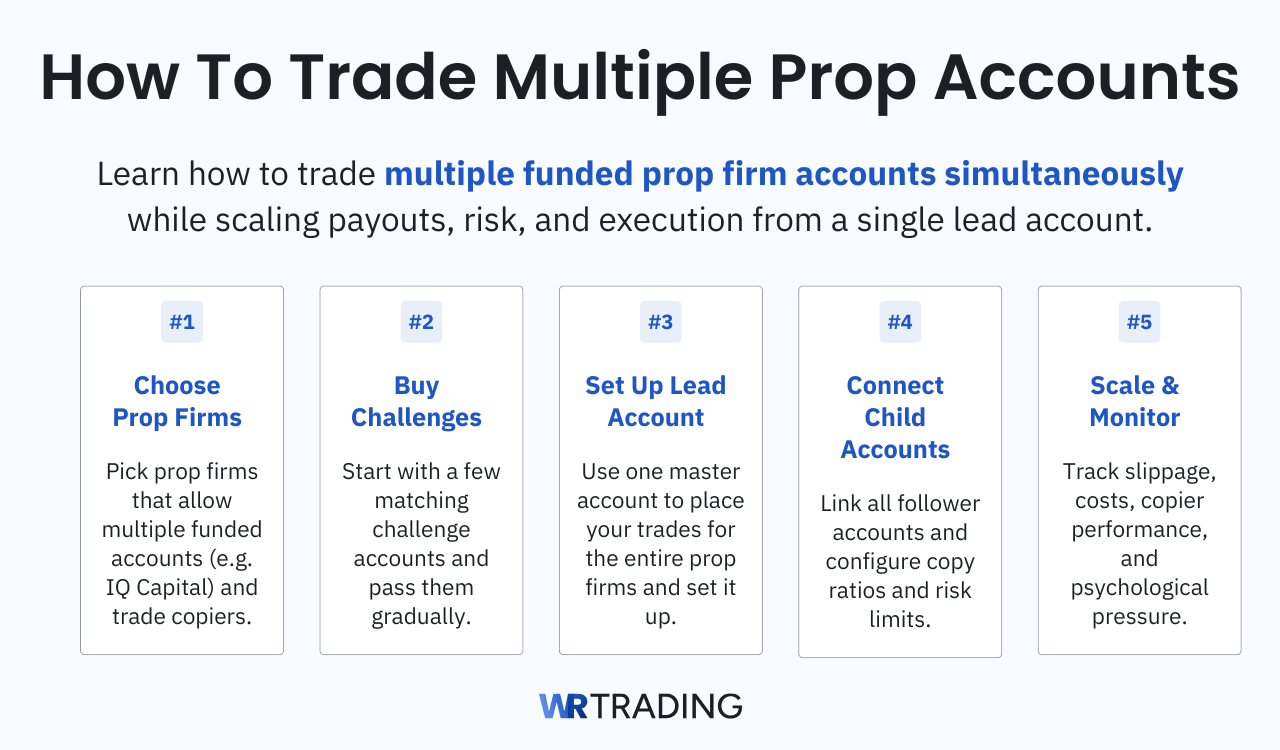
We’ll walk you through the prop firms that permit multi-account management, the setup sequence from buying challenges to configuring a trade copier, and the platforms that handle the workload. Also, we’ll discuss the psychological and financial realities of scaling your profit across multiple funded accounts.
Key facts about multi-prop-account-trading:
- Available Prop Firms: IQ Capital and APEX are the two firms we use after testing multiple providers, because both allow multiple prop accounts
- Multiple Accounts: Managing multiple accounts through a single lead account lets you scale returns without adding extra screen time or making separate trading decisions.
- Chances: One winning trade pays out across all connected accounts, multiplying income from the same setup and trading period. This increases the chances of making more money from your strategy.
- Risks: Slippage causes children to fill at slightly different prices, and a single copier setting error can breach every account at once.
- Difficulty: Moderate to high. The setup requires precise platform and copier configuration, and the psychological weight of seeing multiple accounts draw down together is hard.
See here the video by our trading expert Andre Witzel on how to get started:
1. Choose Prop Firms That Allow Multiple Account Management
The first problem we encountered when exploring multi-account trading is that most prop firms either ban copy trading across accounts outright or bury restrictions deep in their terms, making the practice unworkable.
Some firms allow you to hold several accounts but require each one to trade independently with no duplication, which defeats the purpose of scaling a single strategy. Before you spend funds on challenges, you need to confirm in writing that the firm permits you to trade multiple prop accounts simultaneously.
The Best Prop Firms That Allow Multiple Funded Accounts:
During our testing and research, two firms stood out to us as the best options for traders who want to run a multi-account setup: IQ Capital and APEX Trader Funding. IQ Capital operates through the Volumetrica platform, offering crypto and futures challenges. Evaluation challenges start at low price points, from $99 to $999, and include occasional promotions that let you test the system for as little as $1.

The firm supports holding multiple funded accounts simultaneously and does not restrict traders from using a Trade Copier to manage them from a single lead account. Also, their soft-breach system gives you a buffer on position sizing violations before disqualification, which is needed when you are copying trades across accounts with different balances.
APEX Trader Funding is our 2nd choice for traders who want to scale aggressively, allowing up to 20 funded accounts. APEX supports trade copying across its accounts through platforms like NinjaTrader, Tradovate, and Rithmic, plus the firm has a great reputation, scoring 4.4 stars on Trustpilot from over 19k reviews. We recommend APEX because, unlike other prop firms, they are straightforward about their rules regarding multiple accounts and offer highly customizable challenges.
2. Buy Multiple Challenge Accounts
Once you have selected a firm that permits multi-account trading, next you need to purchase challenge accounts that will eventually become your funded portfolio. We like starting with 2 or 3 accounts rather than jumping straight to 5 or 10, because operational complexity scales faster than most traders expect, and a mistake that breaches one account breaches all of them simultaneously when trades are copied.
Passing two or three challenges first proves that your strategy works under evaluation conditions and gives you time to learn the trade copier software without risking five sets of activation fees.
Purchase challenges that have the same account size and the same rule set, because mixing a $50,000 account with a $150,000 account in the same copy group creates position sizing complications that require constant adjustment. Matching account sizes lets you set a straightforward 1:1 copy ratio in your Trade Copier, so the software mirrors every trade evenly. Also, it’s possible to make 1:2, 1:3 or 1:0.5 ratios if that’s what your accounts require.
We also recommend passing the challenges one at a time rather than trying to clear three evaluations simultaneously, because the mental load of managing multiple evaluation accounts with no income yet is significant, and the timer on each challenge adds unnecessary pressure when stacked. Pass the first, secure the funded status, pass the second, and so on, then activate the copier once all accounts are live and ready to trade as a group.
3. Set Up a Parent (Lead) Account
The lead account is the single funded account where you place every trade manually, and the trade copier reads this account to replicate orders across the rest of your portfolio. Follow these steps to configure it correctly.
- First, decide which of your funded accounts will act as the lead. We advise choosing the platform account you find fastest to trade on and the connection you trust most, because any lag or platform freeze on the lead account affects every child account in the group.
- Open that account’s trading platform and confirm that your prop firm connection is stable and that you can place and cancel orders without delay.
- Next, launch your trade copier software and locate the master or transmitter setup section, where you specify which account to listen to for trade signals.
- Select your lead account from the list of available connections, and if the copier asks for account credentials or an API key, enter them exactly as provided by your prop firm. This step binds the lead account to the copier so that every order event, including entries, stop-loss movements, and partial closes, is captured and ready for replication.
- The final configuration step is to set the lead account as the single source of truth for position sizing, meaning you do not place trades manually on any other account from this point forward, and you disable any automated strategies on the lead that the copier might misinterpret as duplicate signals.
- After the lead is linked, place a test trade with the smallest possible size while the children are still in simulation mode or disconnected, then verify that the copier logs show the trade was detected and is waiting to replicate.
4. Set Up Children Accounts That Copy Your Lead Account
Afterward, connect each child account to the trade copier one at a time, entering the account credentials for each funded profile you want to include in the group, and clearly label each account so you can identify it later in logs and reports. Then navigate to the copier’s group or follower settings and assign every child to the lead account you configured earlier. This tells the copier which master to follow for trade replication. Double-check the assignments before moving on, because an unassigned child will sit idle while the rest of the group trades.
Set the copy ratio for each child using a simple formula: divide the child account’s balance by the lead account’s balance and round down slightly for safety. Identical accounts get a ratio of 1.0, and a child half the size gets a ratio of 0.5. Enter this number into the copier’s lot or contract multiplier field for that specific child, which controls position sizing and keeps each account within its drawdown limits without manual adjustments during fast market movement.
Finally, configure a per-account daily loss limit in the copier that matches the prop firm’s rule for that account size, and enable the automatic flatten-and-disconnect option so that a child hitting its loss threshold stops trading immediately, without affecting the rest of the group.
Run a final test by placing a micro trade on the lead and watching every child platform to confirm the position appears, the stop-loss and take-profit are replicated correctly, and all positions are closed cleanly when the lead exits.
5. Modify the Trade Copier Adjusting Your Strategy
The copier settings you choose directly control how orders land on your children accounts, and a single wrong value can cause slippage, a missed fill, or even a rule breach. Here’s an explanation of what each field does:
Child Account Settings
- Copy mode: This decides how the copier sends your trade to the other accounts. It can either copy every order action you take, like entries, stops, and changes, or copy only the final position. For prop trading, we advise using the order-to-order setting, which copies everything.
- Copy delay: A very short pause between the moment you place a trade on your lead and when it reaches the other accounts.
- Resyncro mode: This tells the copier what to do if one of your prop firm accounts falls out of line with the lead account. Maybe a trade only partially filled on one account, or a connection dropped briefly. This setting gets that account back in sync.
- Expiration logic: This setting applies when a trade fills perfectly, but one of your child accounts still shows the order as pending. It tells the copier to cancel that stuck order after a set time, so it does not hang there forever and cause problems.
- Expiration seconds: The number of seconds the copier waits before giving up on a stuck order. You want this short enough that the account does not sit unprotected for long, but not so short that valid orders are cancelled before they have time to fill.
- Synchronization timeout: How long the copier waits for a child account to confirm that it received or matched the order. If no confirmation comes within this time, the copier treats that account as out of sync and moves on to fix it.
- Resynchronization attempt delay: A short waiting period after a failed sync attempt before the copier tries again. This pause stops the copier from sending too many requests too fast.
Parent Account Settings
- Parent account: This is where you pick which of your funded prop firm accounts is the lead, the one you place all trades on manually. The copier watches this account and copies everything from it. OCO stands for One-Cancels-Other, which is how linked stop-loss and take-profit orders work. These settings control how those protective orders copy across to your other prop firm accounts.
- Bracket Child Ticks Margin: Since each account might fill at a slightly different price, this adds a small extra buffer to the stop-loss and take-profit orders on the child accounts. It stops a tiny price difference from accidentally hitting your stop.
- Bracket Postpone Fallback Insert: If the copier cannot place the linked stop-loss and take-profit orders on a child right away, it waits a short moment before placing a backup order. This keeps the child from ever being in a trade without protection.
- OCO Cancel Fallback Postpone: When the copier needs to cancel an existing linked order and place a new one, this gives the cancellation a little time to go through. If the cancel request gets stuck, a backup kicks in so you do not end up with double orders.
- OCO Trailing Stop Fallback Postpone: For trailing stops in linked orders, this short pause allows the copier to adjust the trail smoothly before forcing a backup order. It keeps your trailing stops working correctly across every funded account.
Profit Potential Using Multiple Prop Accounts
To better understand why using multiple prop firm accounts can be lucrative, here is a quick example. Your lead-funded account has a balance of $100,000, and you connect four child accounts of the same size using a 1:1 copy ratio. You control $500k of buying power and risk $5,000 per trade using the 1% rule. If your strategy produces a 10% monthly return, that is $10,000 on the lead alone.
However, with all five accounts trading the same plan, the total monthly profit becomes $50,000, which is five times the return for the same trading decisions and the same screen time. The profit leverage factor here is 5x, meaning your returns scale directly with the number of identical accounts you copy to, without increasing the risk per account.
Which Trading Platforms Are Suitable for Multiple Prop Account Trading?
The best trading platforms for managing multiple funded accounts are Volumetrica, Sierra Chart, and ATAS, all of which are compatible with IQ Capital and APEX Trader Funding. We arrived at these recommendations after testing each platform with live accounts and a trade copier active, measuring how tightly fills replicated and how the software held up during volatile market conditions.
Volumetrica
Volumetrica is the free native platform for IQ Capital and comes with a built-in trade copier that eliminates the need for third-party software, which simplifies the entire setup process from challenge to funded account management. The platform is designed around order flow and volume profile tools, so you can analyze market depth, track Delta divergence, and place trades on the same screen that manages your multi-account replication.
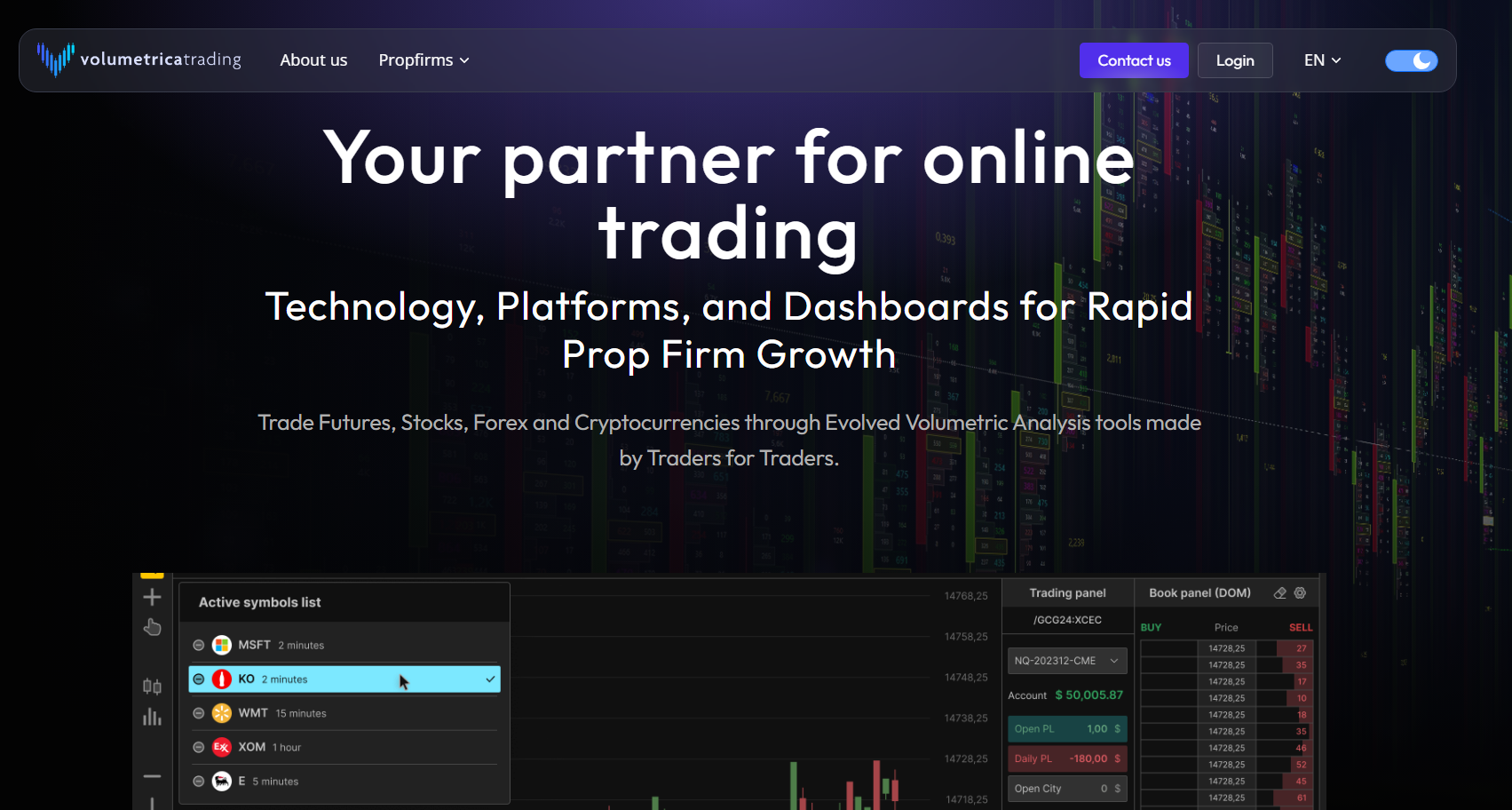
We have found that the built-in copier responds quickly because it operates within the same ecosystem rather than bridging across external APIs, and this tight integration reduces the latency that causes fill discrepancies between a lead account and its children. For traders running multiple funded accounts through IQ Capital, Volumetrica allows you to connect each account to a single dashboard and assign copy ratios, risk limits, and stop-loss parameters for each child account without leaving the platform.
The interface includes multi-level take-profit and stop-loss management, meaning you can set several partial targets on the lead and have them replicated exactly across all followers. We recommend Volumetrica as the starting point for anyone using IQ Capital because the setup time is minimal, the learning curve is manageable for beginners, and the platform’s native design avoids compatibility issues that appear when forcing a third-party copier onto a prop firm’s infrastructure.
Sierra Chart
Sierra Chart is a professional charting and execution platform, available since 2023, and is compatible with IQ Capital and APEX via data providers such as Rithmic and CQG. It’s one of our top multi-account choices because you can open the platform several times on your computer, each instance connected to a different prop firm account, and then use a trade copier add-on to mirror your trades from the lead account to every other instance with very little delay.
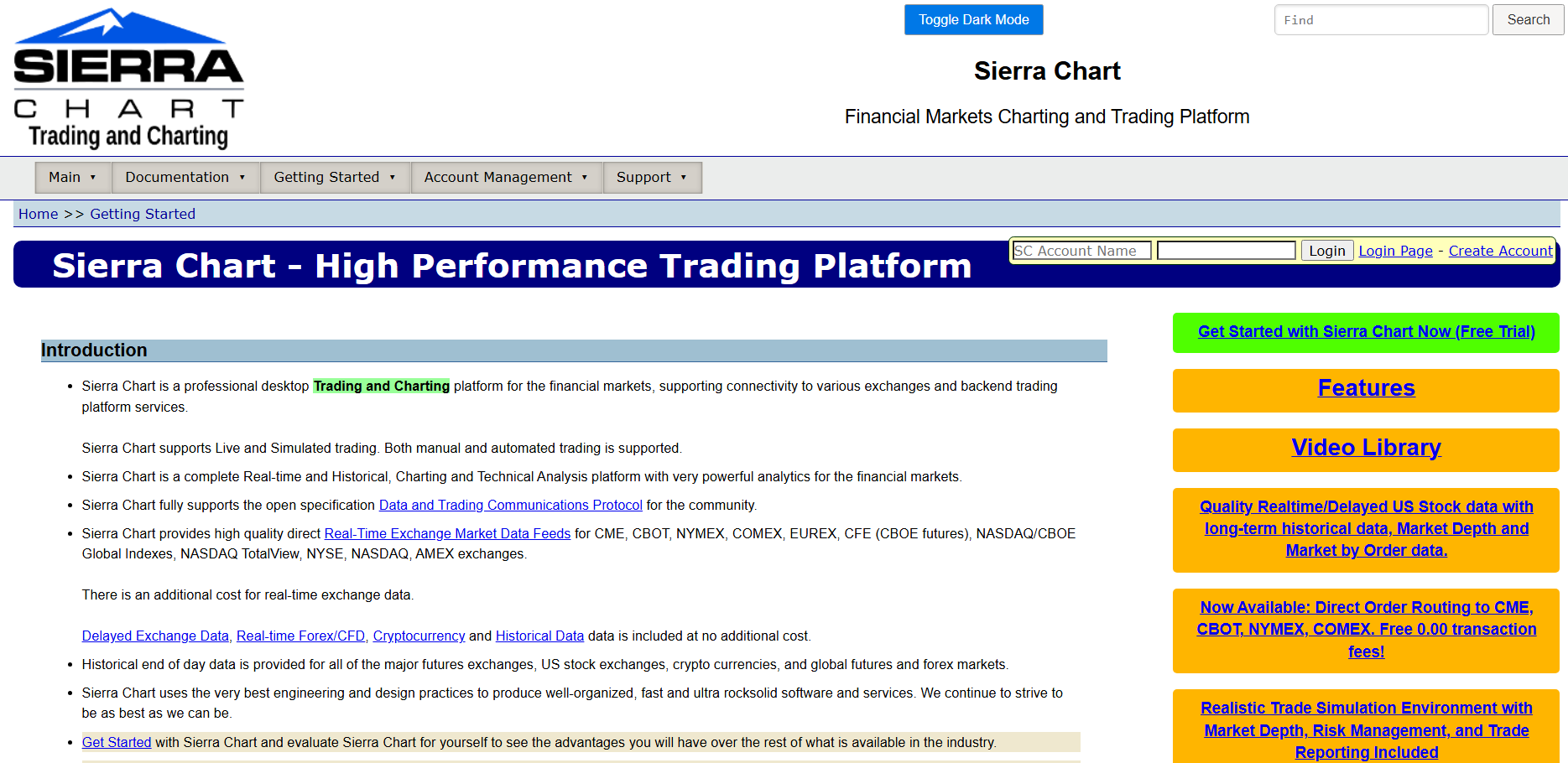
However, our honest take is that Sierra Chart is not the easiest platform to set up the first time, because it asks you to configure data feed connections and understand how the copier links each instance together. We strongly suggest spending a full week in simulation mode before trading live-funded accounts, as a small configuration error can cause delays that lead to different fill prices between your lead and child accounts.
Pricing:
- Base Standard Sierra Chart – $26/month
- Base Sierra Chart with Advanced Features – $36/month
- Integrated Standard Sierra Chart – $36/month
- Integrated Sierra Chart with Advanced Features – $46/month
- Sierra Chart with Advanced Features and Market by Order – $56/month
ATAS
ATAS is built for order flow analysis and includes a Following Manager module that copies orders and positions from a provider account to multiple follower accounts. The platform integrates volume footprint charts, cluster analysis, and DOM trading tools that help you time entries with precision, and the copy trading feature runs natively, meaning there is no need to bridge accounts through a separate application that introduces additional latency.

For traders who rely on reading the order book and spotting absorption patterns, ATAS combines analytical and execution tools into a single environment, reducing the cognitive load of switching between a charting platform and a copier dashboard. The Following Manager allows you to set position size ratios per follower, manage risk limits, and monitor execution across all connected accounts from a single control panel.
We prefer ATAS for traders whose strategy depends on reading volume and order flow in real time, because the platform’s visualization of market participants creates a clearer picture of where liquidity sits and when price is likely to react. The platform works with several prop firms via Rithmic and CQG connections, and while it’s not as universally compatible as some alternatives, the specialized tools it provides for order-flow traders make it a solid option for managing multiple funded accounts that rely on this analytical approach.
Pricing:
- Start – free
- Plus – $24.95/month
- Pro – $69.95/month
- Ultra – $89.95/month
Pros and Cons of Managing Multiple Prop Trading Accounts
The biggest pro of using a trade copier is that it lets you scale one good strategy across several funded accounts without extra screen time. However, each new account also adds costs, technical complexity, and a heavier emotional load when trades go against you. The benefits multiply your profit potential fast, while the drawbacks multiply every mistake just as much, and we recommend understanding both sides clearly before building a multi-account setup.
Pros
One winning entry pays out across every connected account- A trade copier removes the need to manually enter orders on each platform
- You only watch one chart to manage your entire portfolio
- Daily profit targets can be reached faster with multiple simultaneous payouts
- You can diversify across prop firms and avoid relying on one payout schedule
- Smaller individual accounts let you stay well inside risk limits while scaling income
- Different lot multipliers let you match position size to each account’s balance
- Any small improvement to your trading plan instantly benefits every connected account
- Journaling is simpler when all accounts share the same trade history exported from the copier
- Backup accounts already funded and idle reduce the downtime if a primary account gets breached mid-month
Cons
Activation and monthly fees multiply with each added account- Slippage causes children to fill at slightly worse prices than the lead
- A single copier setting error can breach every account at once
- Many prop firms ban copy trading, and rules can change with little notice
- Each child still carries its own daily loss limit and trailing drawdown threshold
- Adding accounts too early amplifies strategy flaws before they are fixed
- Copier latency across platforms can cause timing gaps on fast entries and exits
- Data feeds and VPS costs add monthly overhead before any profit is taken
- Failing one evaluation while others are active splits your focus and can waste time
- The urge to overtrade increases because every tick movement is amplified across the group
What Are the Mistakes When Trading Multiple Prop Account?
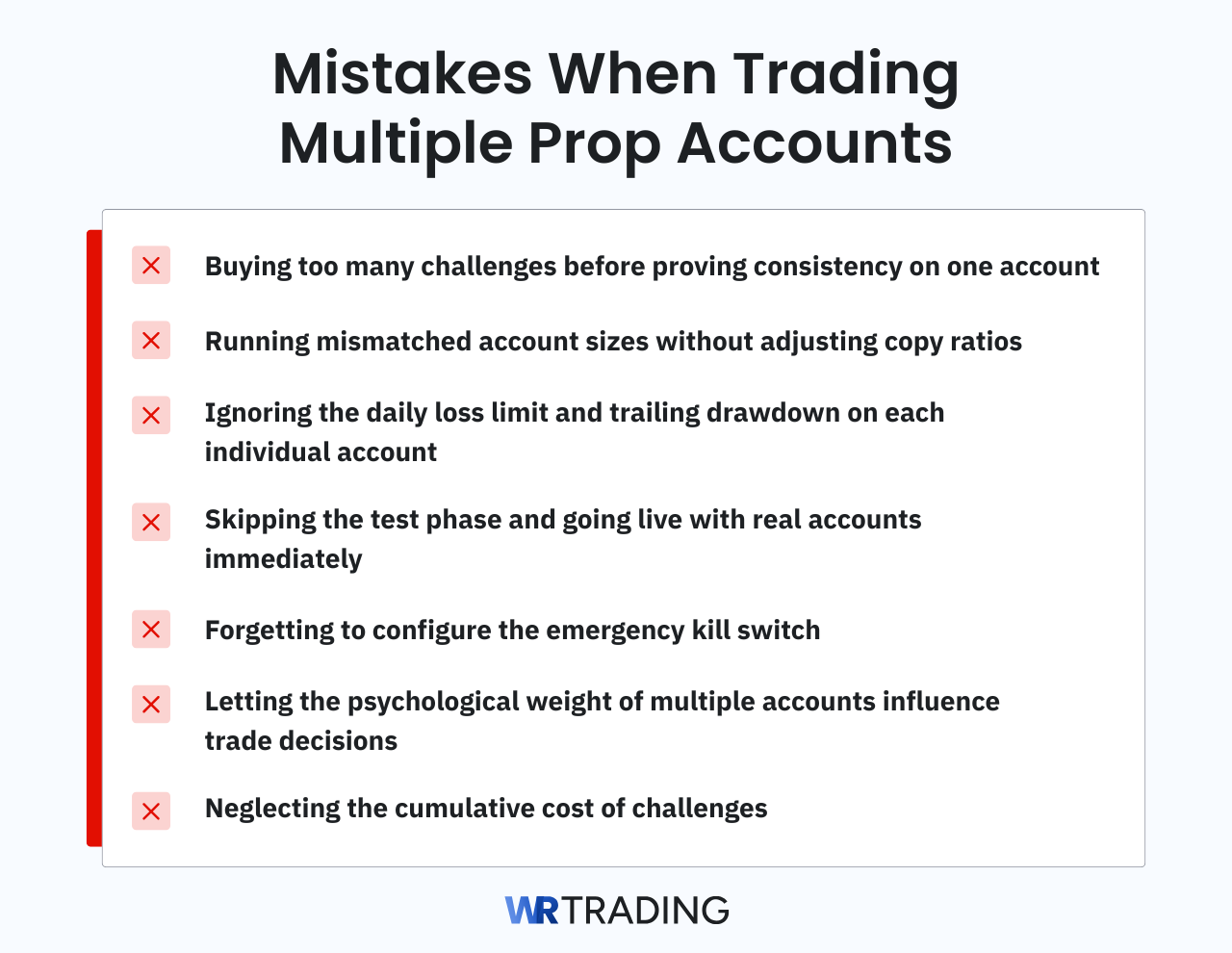
At WR Trading, we have seen traders successfully overcome challenges only to lose multiple funded accounts due to mistakes they could have avoided. The errors below are the ones every trader should review in our opinion before placing a single live trade across multiple accounts.
- Buying too many challenges before proving consistency on one account: A trader who cannot pass a single evaluation with a verified track record will not suddenly become profitable by stacking five challenges at the same time. We suggest securing at least two payouts from one funded account and confirming that your strategy functions under live conditions before purchasing a second challenge.
- Running mismatched account sizes without adjusting copy ratios: When a $25,000 account copies a $150,000, the larger account takes on risk that may exceed its own drawdown limits, and the reverse scenario can overwhelm a smaller account on a single trade. Each child account needs its own lot multiplier or contract ratio calculated against its balance and the prop firm’s specific loss thresholds.
- Ignoring the daily loss limit and trailing drawdown on each individual account: A trade that fits comfortably within the lead account’s remaining loss allowance might breach a child that started the session closer to its limit because of an earlier losing trade that did not replicate perfectly. The trade copier must track each account’s P&L independently and enforce rules at the individual level rather than treating the group as one combined balance.
- Skipping the test phase and going live with real accounts immediately: We see traders configure a copier, connect five funded accounts, and start trading within the same hour, only to discover a connection glitch or a settings error after positions are open and moving against them. We recommend running every new setup through at least one full simulated session with micro contracts or minimum size, checking fill prices and order behavior before risking actual capital.
- Forgetting to configure the emergency kill switch: When the market accelerates, and you need to stop every position across every account in seconds, a kill switch that lags or fails on one child leaves you exposed with no manual backup. Test the kill switch during a quiet period, confirm that it closes all positions on all accounts within your acceptable window, and know exactly where the button is before you ever need it for real.
- Letting the psychological weight of multiple accounts influence trade decisions: Watching five accounts draw down simultaneously can make a 2% loss feel like a 10% hit, and that magnification can cause traders to exit trades early or skip valid setups out of fear. You should treat the lead account as the only account during the session, focusing on execution quality, and disabling the P&L display on the children accounts so you are not psychologically affected on a five-figure swing while managing a position.
- Neglecting the cumulative cost of challenges: Traders who spend $1,500 on challenges and activation fees before placing a single trade need a strong and immediate return just to break even, and we’ve seen the financial pressure of that overhead leads to forcing trades that fall outside the plan. Our advice is to calculate the total upfront and monthly costs of the entire multi-account setup before purchasing, and to choose a prop firm with low entry fees so that net profitability is achieved sooner and the process is less stressful.
Our Experience: Be Aware of the Slippage when trading multiple Funded-Accounts
Running multiple prop accounts scales your profits faster than anything else we have tested, but in practice, execution is never as clean in live markets. The main issue we deal with regularly is slippage, where a trade copied from your lead account fills at a slightly different price on a child account because each order hits the market independently, and a split-second delay can change the fill when the price moves quickly.
We have watched one child fill a tick worse while another fills a tick better on the same signal, and over weeks of trading, that variance diminishes the group’s consistency. We have also seen a child miss a fill completely due to a brief connection drop, leaving it out while the rest of the group enters the position. From our experience, the only way to know how much slippage to expect is to run the copier through at least a week of simulation trading.
Can a Prop Firm Ban You for Trading More Than One Account at the Same Time?
Yes, a prop firm can and will ban you if you trade multiple accounts in a way that violates their specific policies, and the responsibility to know those policies is yours. Some firms prohibit copy trading between accounts, others allow internal copying of your own accounts but ban external signal copying or cross-firm replication. Knowing the difference matters because breaking a rule that is clearly stated in the terms leads to account termination without a refund.
The most common violation we see is traders copying trades from someone else’s master account into their prop firm accounts. Almost every firm bans it because it undermines the evaluation of individual trading skill that the firm’s model depends on. Another violation occurs when traders use a copier to run opposite positions across accounts, such as going long on one and short on another to hedge, which firms interpret as an attempt to game the evaluation system rather than legitimate trading.
The advice we give to every trader is to read the firm’s copy trading policy before purchasing a challenge, and confirm the policy with customer support in writing. Also, review the rules each month in case the firm updates its terms.
Why Costs Matter When Trading Multiple Prop Accounts
The financial math of running multiple accounts looks appealing from a profit standpoint, but the cost side is where traders underestimate the capital required just to get started and stay active. Every challenge account has a purchase fee, every funded account has an activation fee, and if you are running a trade copier that requires a paid license, those subscriptions add another recurring layer.
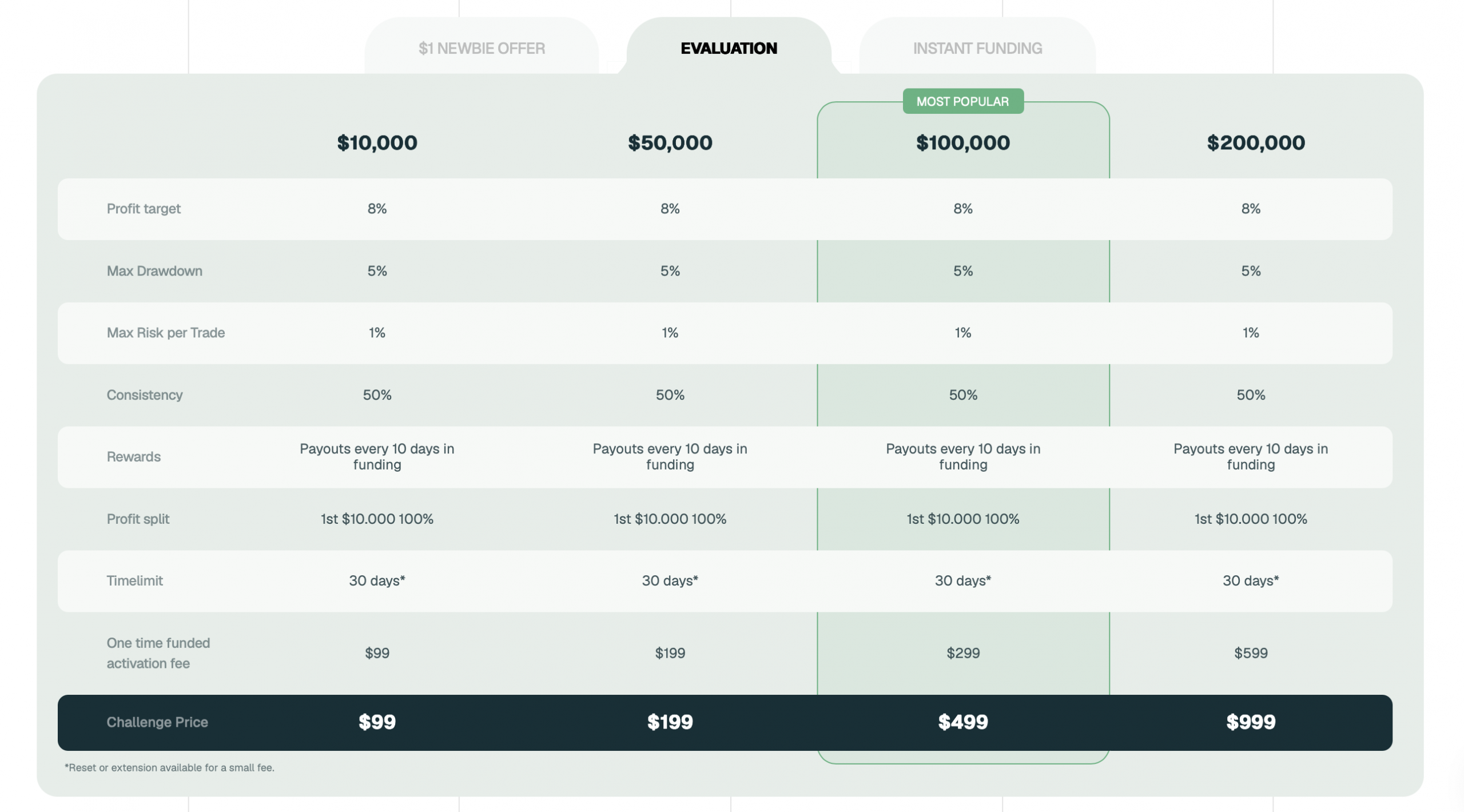
A trader who wants to run five $100k accounts costing $499 for evaluation and $299 for activation each will spend $3,990 before a single trade is placed. That figure does not include the monthly copier fee, platform data subscriptions, or the cost of replacing accounts that get breached during the learning phase.
This is why we recommend prop firms like IQ Capital, where the entry cost is lower, and promotions reduce the upfront financial barrier. Testing a multi-account system on expensive challenges multiplies the financial pain of every mistake, a burden that a cheaper entry point would absorb more gently. The long-term profitability of a multi-account strategy depends on keeping overhead low while the trading edge compounds across accounts, so choosing a firm with reasonable fees matters.
Here’s a table going over the exact fees per account you’ll encounter with IQ Capital:
| Cost Type | Fee |
|---|---|
| $100k account evaluation | $499 |
| Activation fee | $299 |
| Reset fee | $49 |
Psychological Aspect When Using Multiple Funded Accounts
Trading with a single funded account carries enough psychological weight on its own, but managing several accounts simultaneously creates a mental environment where every decision feels larger. One advantage we have observed is that seeing only the lead account on your screen, rather than a combined balance that reflects the full capital pool. This keeps your focus on the trade process instead of the dollar amount at risk.
Many of our traders at WR Trading find this separation makes it easier to follow their plan without the emotional swings that come from watching a larger number move with each tick. The disadvantage is that when trades go against you, the losses compound across every account simultaneously, and the drawdown that feels manageable on a single statement can trigger panic when you mentally calculate the total loss across 5 funded accounts.
We recommend that traders treat their lead account as the only account for psychological purposes, focusing on execution quality and trusting the copier to handle replication, and not checking the P&L on each child account individually throughout the trading session. We’ve noticed the traders who last and become profitable in multi-account setups are those who build systems that remove themselves from the emotional loop.
Conclusion: Managing Multiple Prop Accounts Can Scale Your Profit
In conclusion, running multiple prop firm accounts from a single lead can significantly multiply the profit generated by every winning trade. A trader who produces a consistent 5% monthly return on one $50,000 account earns $2,500, while that same return across five identical accounts generates $12,500 from the same trading decisions and the same screen time.
We’ve covered the main aspects of having multiple prop accounts, including the mistakes, costs, and psychological weight that come with running them. Now it’s up to you to choose a compatible prop firm, pass challenges, configure your copier with proper lot ratios, and stay disciplined with each account’s rules.
At WR Trading, we teach traders how to build multi-account systems that scale profits without scaling risk. Our mentoring covers the exact copier configurations, platform selection, and rule compliance checks that make the difference between a growing funded portfolio and a set of breached accounts. If you are ready to scale your trading across multiple funded accounts with a structured plan and direct guidance from traders who operate these setups daily, connect with WR Trading today and start building your multi-account system with professional support.
FAQs: Most Asked Questions on Trading Multiple Prop Accounts
Can I Use the Same Trade Copier for Both Forex and Futures Prop Accounts?
Yes, many trade copiers support cross-asset copying if they connect to the platforms used by your prop firms, such as MetaTrader for forex and NinjaTrader or Rithmic for futures. The limiting factor is whether the copier can handle the different order types and contract specifications of each market, so we advise testing with micro contracts and minimum lot sizes first.
Will a Prop Firm Know I’m Using a Trade Copier?
Firms can detect trade copiers through order-timing patterns, IP addresses, or specific trade-copier software signatures, especially when their risk team reviews flagged accounts. This is why it’s important to trade only with firms that explicitly allow the practice.
How Many Funded Accounts Can I Realistically Manage Without Burning Out?
In our experience, the sweet spot for most traders is between 3 and 5 accounts, because beyond that, the operational overhead of monitoring connections, checking fills, and managing individual rule compliance starts to take too much of your focus away from trading. Scaling to 10 or 20 accounts requires a rock-solid, fully automated routine and a VPS to keep the mental load manageable.
Can I Run Multiple Lead Accounts Simultaneously With Different Strategies?
Yes, you can run separate lead accounts, each with its own set of children, but this increases the complexity and the risk of a mistake that mixes signals between groups. Our go-to approach is mastering a single lead account group before even considering a second strategy because the mental load doubles with every new account you add.
Can I Copy Trades Between Accounts at Completely Different Prop Firms?
Yes, traders can hold multiple funded accounts across different firms and copy trades between them, provided the trade copier supports both platforms, and each firm individually permits internal copy trading. The main technical challenge is latency when bridging across different data feeds, so test thoroughly with simulation before committing real capital.

