
FP Trading Review 2026 – All Pros/Cons, Fees & Tutorial



- Instant ECN Execution
- Spreads from 0.0 Pips
- Low Commissions From $3.00/1 Lot per Trade
- 24/7 Personal Support
- MT4/MT5, cTrader, TradingView
- Low Minimum Deposit
- Highly regulated
- Wide selection of account-based currencies
- Broad trading instrument range
- Too many concerns on ECN and execution quality
- Limited account selection
- A few withdrawal options incur some charges
FP Trading is a forex and CFD broker we tested from a trader’s perspective, focusing on the areas that most affect the trading experience. In our review, we looked closely at its regulation, pricing structure, platform range, order execution quality, account setup, and trust level so our readers can see where the broker performs well and where they need to be more careful.
FP Trading stands out to us for its low entry deposit, raw spread account, board platform support, and regulatory coverage across multiple entities. Our expert experience reviewing brokers enables us to assess those details accurately and separate strong marketing claims from what you’ll actually get when trading with FP Trading.
FP Trading Experience Summary from Our Expert:

In my professional view, FP Trading works best as an active trading broker instead of an all-purpose investment platform. I like that it gives traders a choice between a standard account with spreads from 1.0 pip and no commission, and a raw account with spreads from 0.0 pip and a commission of $3 each way, because it makes it easier to match the pricing model to how you trade.
I also see real value in the platform range, as FP Trading supports MT4, MT5, cTrader, and TradingView, and pairs that with leverage up to 500:1. Plus, access to more than 1,000 CFD instruments across forex, commodities, metals, shares, cryptocurrency, and indices.
What I like most is that the offer is built around things active traders can use straight away, such as copy trading, MAM, and PAMM access, FP Trading AI for trade performance analysis, and $1 million in insurance protection. What I do not like is that FP Trading appears weaker from a regulatory standpoint than brokers licensed by top-tier authorities. Also, I would not use FP Trading as a long-term investing platform, as its trading is built around CFDs, which means there is no real ownership of assets.
0 FP Trading Customer Reviews And Ratings
What Is FP Trading?
FP Trading is a multi-asset CFD broker that offers traders access to forex, shares, indices, commodities, metals, and digital currencies via platforms such as MT4, MT5, cTrader, and TradingView. The broker is new as a result of a recent rebrand and officially changed its name to FP Trading on 28th of March 2026, so the company now operates under the newer FP Trading identity while still building on the older and experienced brokerage background.
FP Trading was founded in March 2026 and is based in Euro House, Richmond Hill Road, P.O Box 2897, Kingstown, VC0100, Saint Vincent & the Grenadines. FP Trading started right away with 4 different regulators, which made a good first impression on us, because 4 regulators are not typical for a new brokerage and show us high trust and a real business. FP Trading focuses on active traders and offers features like low-spread pricing, raw and standard account options, copy trading, trading tools, and AI-based performance analysis.
Regarding regulation, we found that FP Trading is subject to oversight by FSA, FSRA, FSCA, and FSC. The offshore regulation provides oversight and trader protections while still allowing features you won’t find on other brokers, such as 500:1 leverage.
Is FP Trading Regulated?
Yes, FP Trading is regulated by multiple entities, but its regulatory profile is medium rather than top-tier when compared to other brokers, as it has only offshore regulation. Here’s a breakdown of who regulates FP Trading:
- FSA in St. Vincent and the Grenadines, Registration Number 126 LLC 2019
- FSRA in Saint Lucia, Registration Number 2026-00106
- FSCA in South Africa, License Number 52858 and Registration Number 2021/465018/07
- FSC in Mauritius, License Number GB26205878 and Registration Number 231866 GBC
What Are the Offers of FP Trading?
The offers at FP Trading are built for traders who want more than just basic forex access. The broker combines several asset classes, multiple trading platforms, copy trading features, and leveraged products into a single service, giving users greater flexibility to use their accounts in line with their own style. Here are the main offerings at FP Trading:
Asset Classes
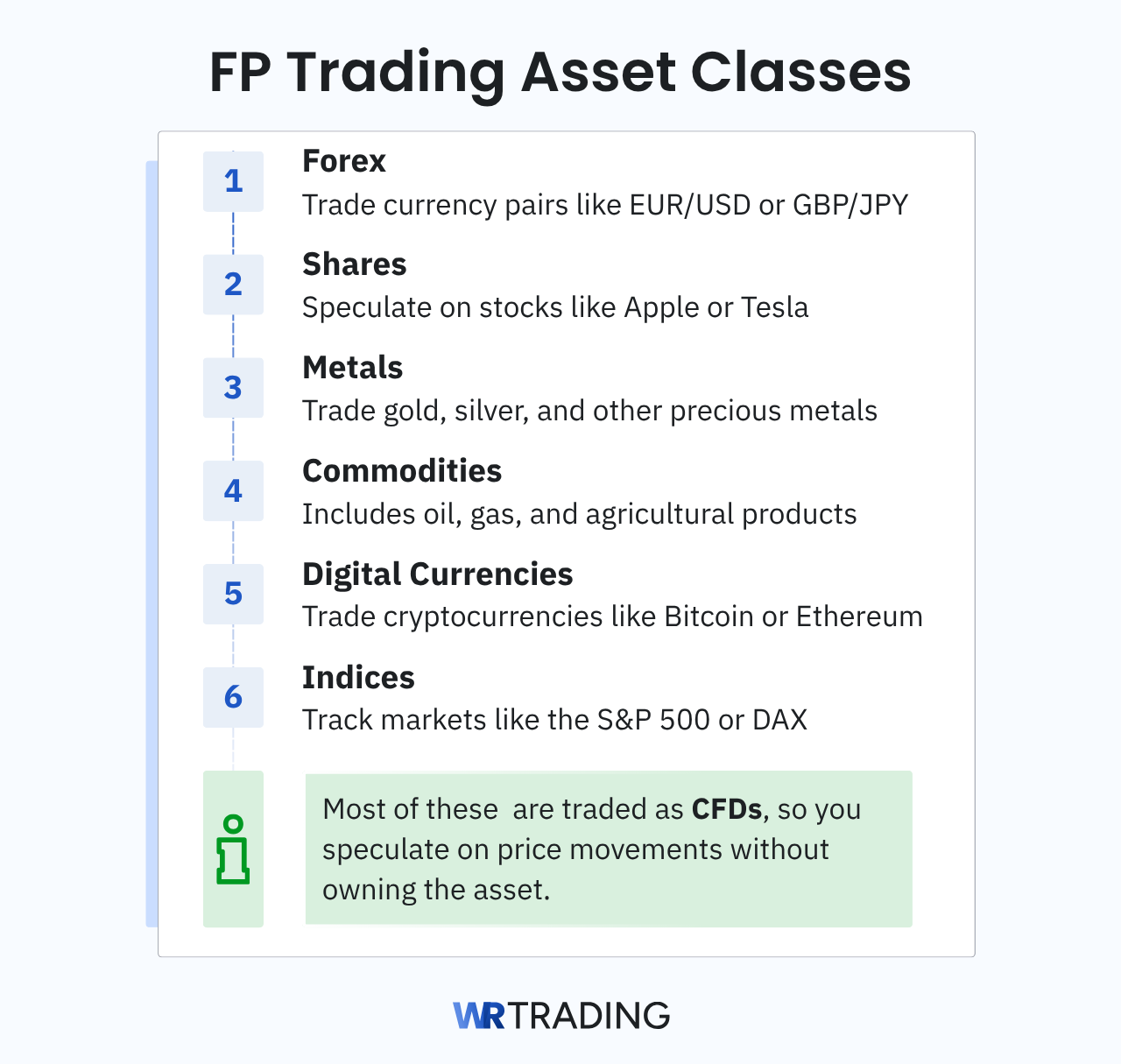
FP Trading provides traders access to more than 1,000 instruments from one account, which is enough to cover most of the markets active retail traders use. The broker lists:
- Forex
- Shares
- Metals
- Commodities
- Digital currencies
- Indices
Therefore, a trader can move from major currency pairs to stock CFDs without switching brokers. That’s a great benefit because different markets lead at different times, and broader coverage gives traders more opportunities to find profitable trades instead of forcing them into one quiet market. A range like that suits traders who rotate between markets based on volatility, news flow, or chart structure rather than sticking to a single instrument.
Financial Products
The main financial product at FP Trading is CFDs. That means traders are using leveraged contracts up to 500:1 to speculate on price movements rather than buying the underlying asset. For active traders, that structure is ideal because it allows long and short positions across multiple markets, which wouldn’t be available with traditional investing.
Trading Platforms
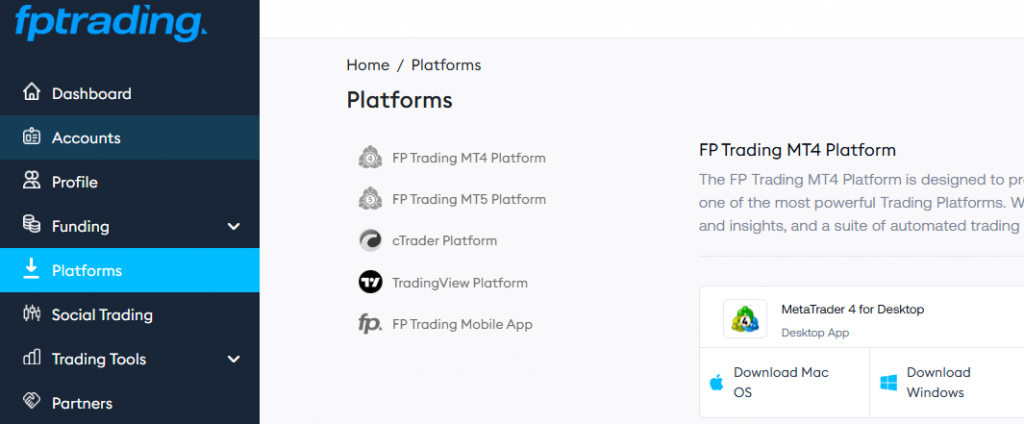
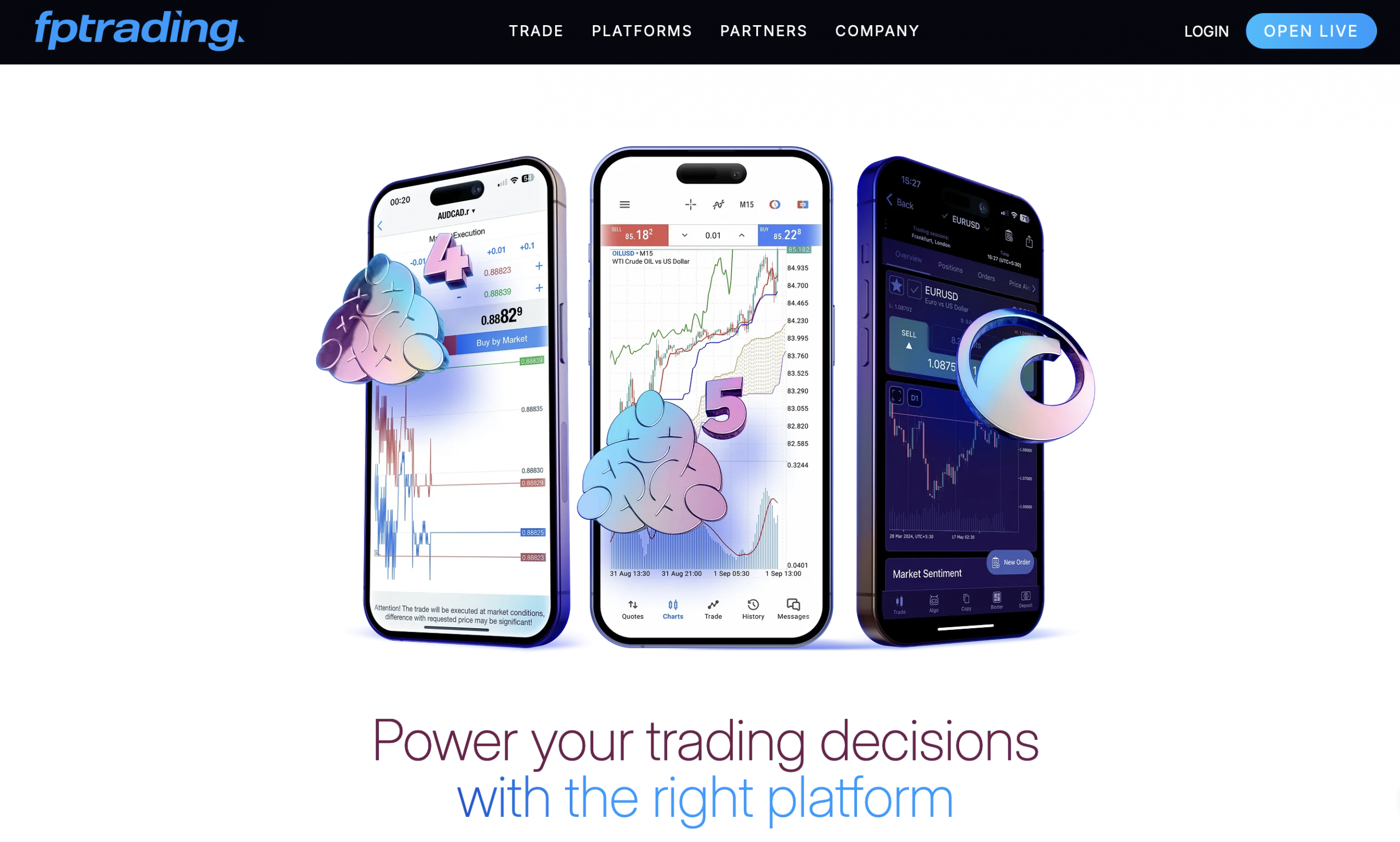
FP Trading supports MT4, MT5, cTrader, and TradingView, giving traders access to 4 platforms trusted across the retail trading space. That is an advantage of the broker, in our expert opinion, because each platform suits a different type of user, from forex traders who want a familiar setup to chart-focused traders who already use TradingView and want to keep the same workflow when they move to FP Trading.
This allows traders to stay with the platform they already know, keep their chart layouts and routines, and focus on execution instead of spending time adjusting to a new trading platform. FP Trading benefits from this because platform familiarity can speed up order placement, reduce avoidable mistakes, and help traders settle into live trading with more confidence.
Moreover, these platforms come with features traders expect when analyzing and managing positions, including technical indicators, multiple timeframes, advanced charting, customizable layouts, and one-click trading. Also, FP Trading supports automated trading and copy trading on selected platforms.
Trading Tools
FP Trading completes its platform offerings with a useful set of trading tools that cover research, trade planning, performance review, and execution support. The broker includes FP Trading AI, Trading Central, Trader Toolbox, a Forex Calculator, and VPS hosting, so traders get more than with other brokers. Here’s exactly what they do:
- FP Trading AI: FP Trading AI helps traders review their own performance in more detail than a standard account summary. It examines trading behavior and highlights patterns that may be undermining results, such as poor timing, inconsistent risk control, or recurring mistakes across similar trades. We recommend this tool for all traders who want to improve decision-making based on actual account history.
- Trading Central: Provides trades with additional market analysis before they enter a position. It helps by highlighting possible trade setups, key price levels, and directional bias, which can save time during market review and provide more information for the trading process. That’s useful for traders who want another layer of analysis alongside their own chart work before committing to a trade.
- Trader Toolbox: Adds 12 extra functions to the MetaTrader platform, making trade monitoring and platform use more efficient. One practical feature we like is the Alarm Manager, which lets traders set alerts for specific market conditions and receive notifications when those conditions are met. That helps traders stay organized and track trades more easily without having to watch the screen all day.
- Forex Calculator: The Forex Calculator helps traders measure the financial side of a trade before placing it. It can be used to check the pip value, margin requirements, leverage effect, swaps, and potential profit, thereby making position sizing more accurate. This is one of our favorite tools as better calculations at entry lead to stronger risk control once the trade is open.
- VPS: FP Trading’s VPS service is built for traders who run automated strategies on MT4, MT5, or cTrader and need the platform to stay active without depending on their own device. It helps reduce the risk of missed executions caused by internet issues, power cuts, or system shutdowns, which is important for traders using Expert Advisors that require stable uptime. VPS comes as a supported feature for clients who meet its account and volume conditions.
Copy Trading
We liked using FP Trading’s copy trading platform through its social trading tab, where users can follow strategy providers and copy their trades into an MT4 or MT5 account. The section is designed to make provider selection more informed, as the platform shows performance history, drawdowns, instruments traded, return figures across different periods, and the minimum balance required to join. That gives traders a better basis for comparison, as they can assess profit and risk before deciding whom to follow.
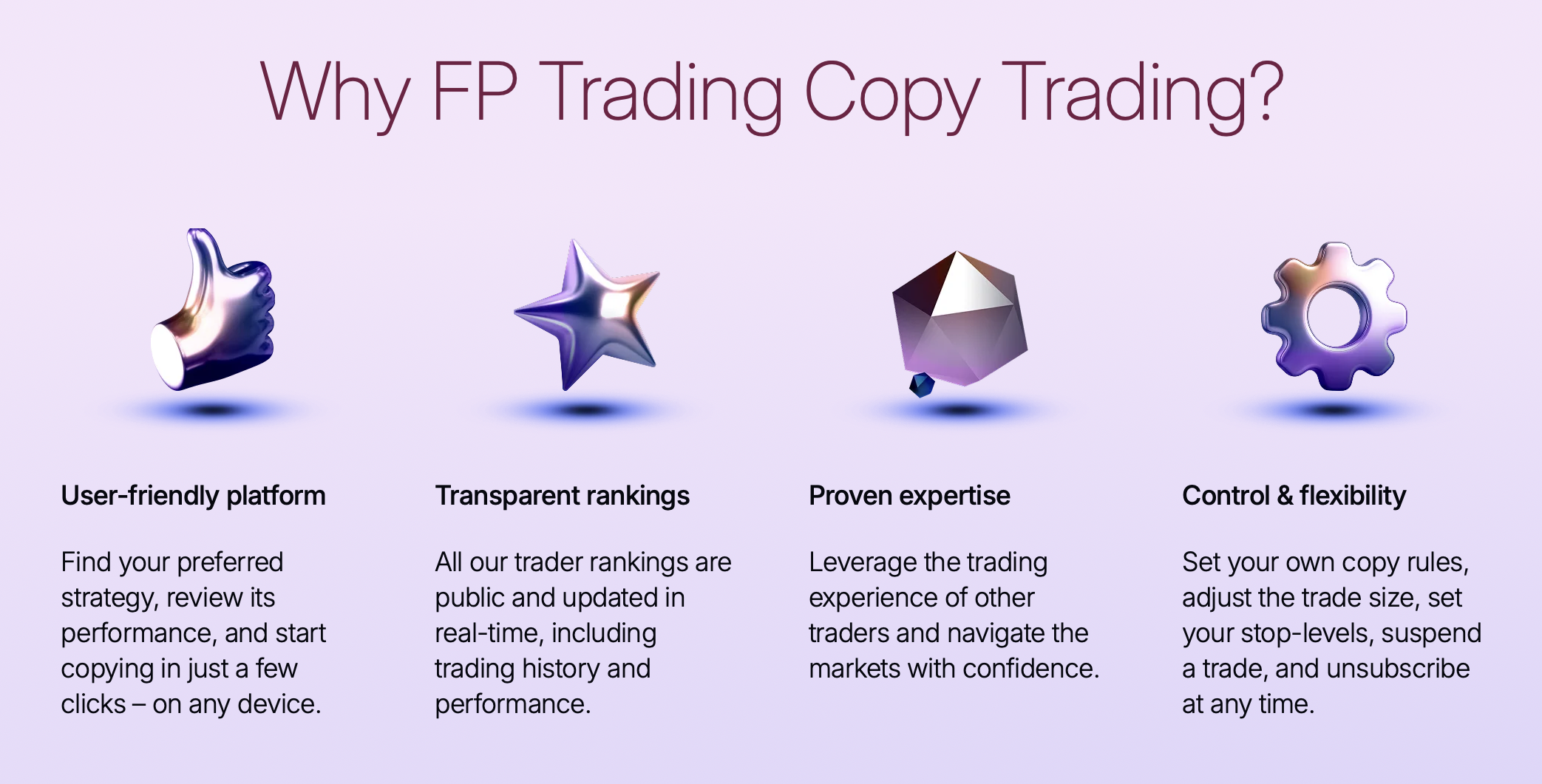
Furthermore, traders on both sides can benefit from the social trading platform. Followers can explore ranked providers, compare statistics, and start copying once their account is connected, while experienced traders can register as providers and make their own strategy available to others. This allows experts to continue trading as they would do on their own while earning a commission on top of it from their followers.
Leverage
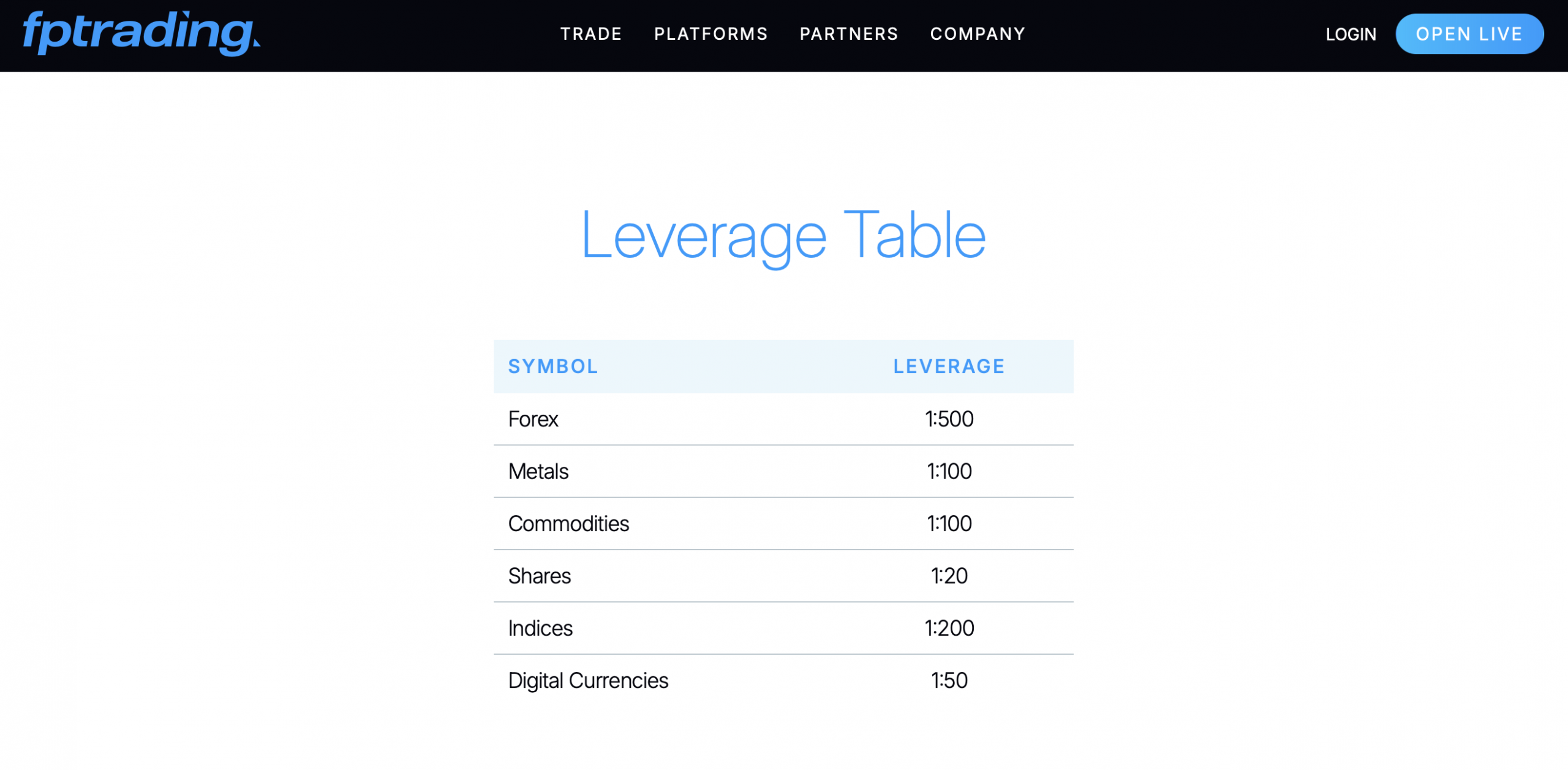
FP Trading’s maximum leverage is 1:500, giving traders high buying power across the broker’s product range. That’s great for traders who focus on short-term moves and want to allocate capital more efficiently across multiple positions rather than tying up too much margin in a single trade.
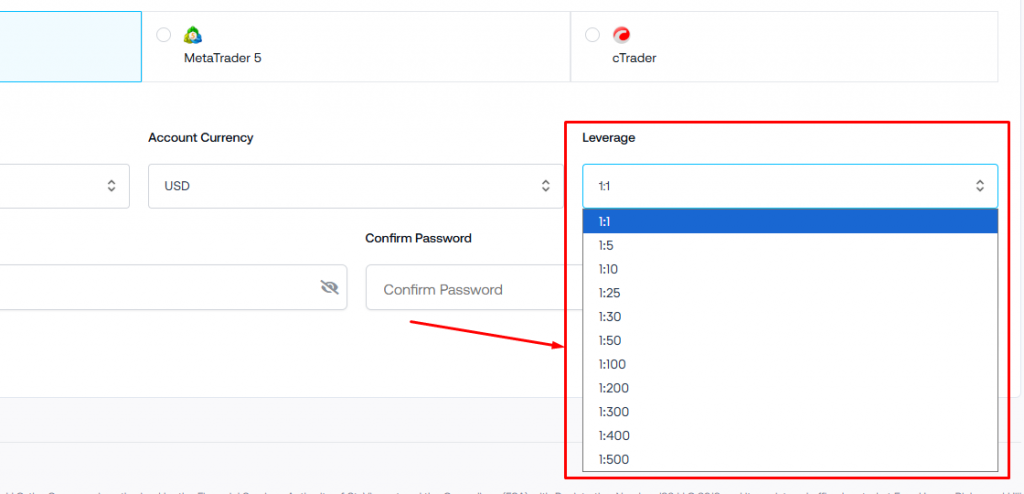
| Asset Type | Leverage |
|---|---|
| Forex | 500:1 |
| Metals | 100:1 |
| Commodities | 100:1 |
| Shares | 20:1 |
| Indices | 200:1 |
| Digital Currencies | 50:1 |
How to Trade With FP Trading
The trading process on FP Trading follows similar steps to other brokers, in our experience, so most traders can move from account creation to live market access within 5 minutes. However, if you are new to trading, here are quick steps on how to trade with FP Trading.
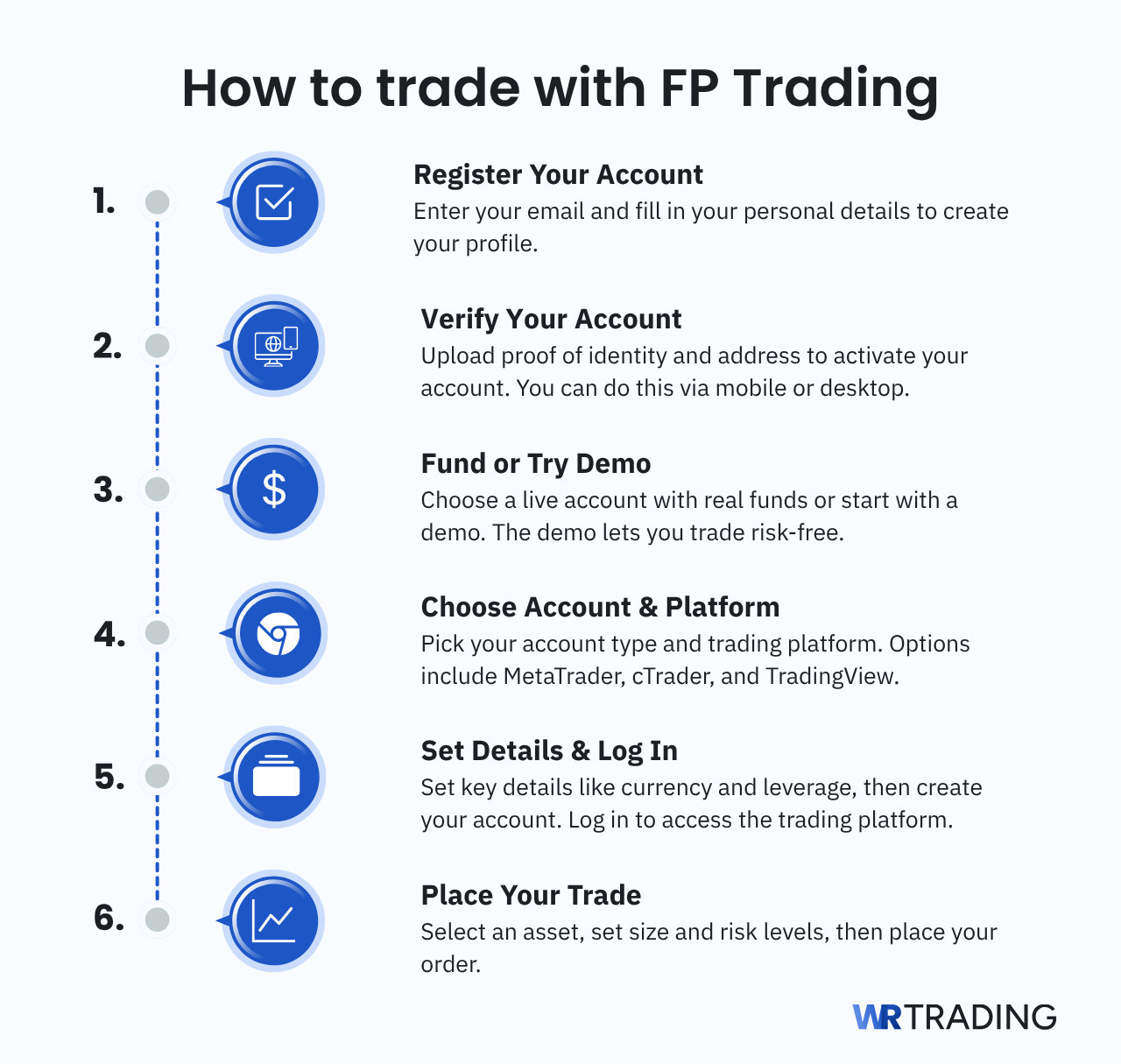
Step 1: Registration
First, enter your email address and open the client profile, then complete registration by filling in your personal details, such as your name, contact information, country, and other standard account data. Then FP Trading asks for further information linked to your financial background, including details such as income, employment, and past trading experience.
Next, you are asked questions about how familiar you are with leveraged products and if you have traded before. Once those details are complete, the process moves to account configuration, where you choose the trading setup you want to open. Select the trading platform, account type, base currency, leverage, and trading account password that will apply to your account.
Step 2: Verification of the Account
FP Trading asks you to verify your account by submitting proof of identity and proof of address. Accepted identity documents include a passport, national ID card, or driving license, while proof of address can be provided with a utility bill, bank statement, or another recent document that shows your name and residential address.
In our experience, verification is easier on mobile, as a QR code is shown on screen for you to scan, allowing you to continue verification on your phone by scanning the documents directly. Desktop users can upload document photos manually if they prefer.
Step 3: Fund Account Or Using Demo Accounts
In the dashboard, FP Trading lets you create more accounts and choose between a live and a demo account. The live account is for real trading and requires a $100 deposit before you can place trades, whereas the demo account lets you use the platform and practice under market conditions without risking real money. The account creation is the same as during registration, letting you pick a trading platform, leverage, and account currency.
Step 4: Choose Your Account Type and Platform
Create the account you want to trade on by going to the “Accounts” tab. FP Trading gives you the choice between a live account and a demo account, so you can either start with real funds or practice first in a risk-free environment.
After choosing the account type, you select the platform you want to use. The options are MetaTrader 4, MetaTrader 5, cTrader, and TradingView, allowing traders to pick the platform they already know or the one that best matches their needs. Alternatively, use the account configuration you created during sign-up.
Step 5: Set the Account Details and Connect it
Before the account is created, FP Trading asks for a few settings that will impact your trading experience. These include:
- Account type (standard or raw)
- Account currency
- Leverage
- Password
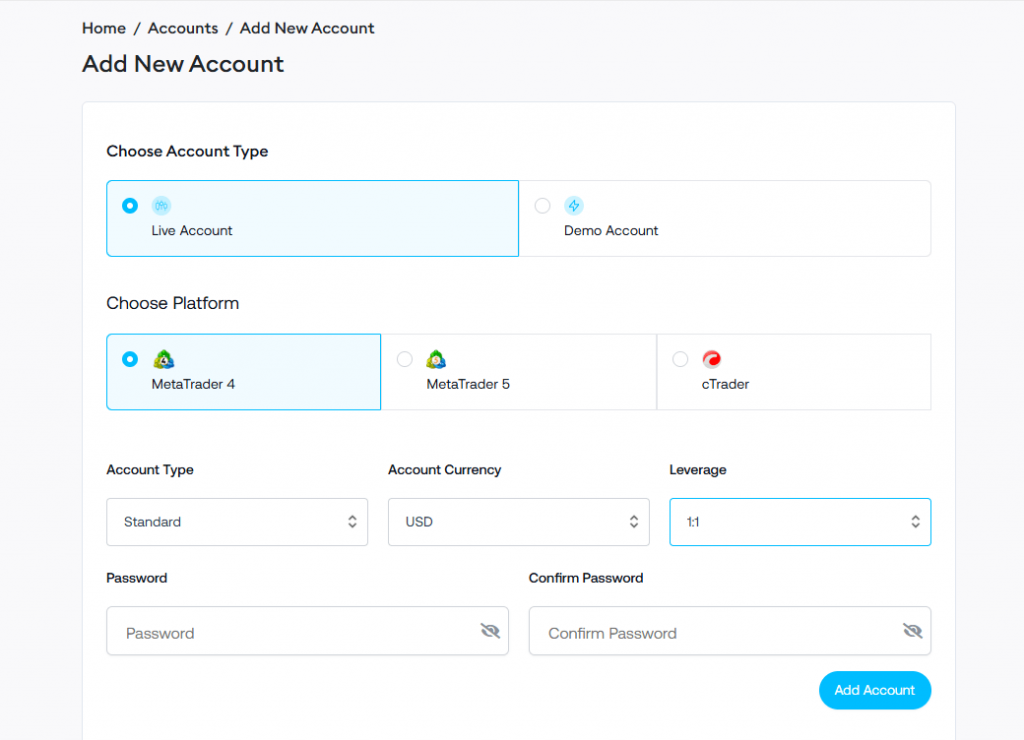
Pick the options you need based on how you plan to trade, since these settings will affect your pricing model and margin requirements. Once those details are filled in, the account can be created by clicking “Add Account”. At that point, you’ll receive the login credentials and server details needed to access the trading platform.
Next, open the “Platforms” tab and click the trading platform you made the account with. FP Trading provides Mac OS, Windows, iOS, and Android for all its trading platforms. MetaTrader 4, MetaTrader 5, and cTrader come with WebTrader, so you can instantly begin trading without downloading them.
Click the trading platform you selected earlier and created the account on, then sign in. Now you should have access to view charts, track live prices, monitor balance, margin, and prepare orders.
Step 6: Choose the Market and Set the Order Details
Afterward, select the asset you want to trade from the symbol list inside the platform and open its chart or order window. This is done by clicking the market from the watchlist or searching for the symbol directly, which loads the live price and makes the order ticket available. Once the asset is selected, enter the position size.
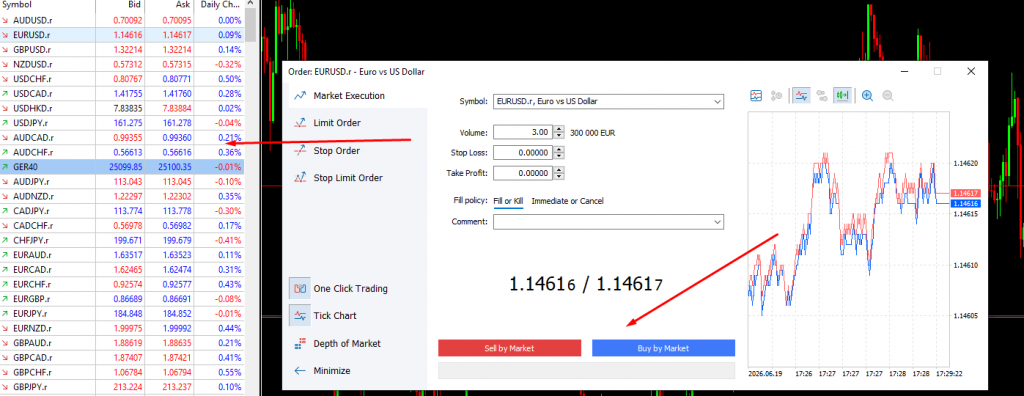
The same order window allows traders to add stop-loss and take-profit before entry, which we recommend to protect capital. A stop-loss sets the price at which the trade will close if the market moves against you, while a take-profit marks the target level if the trade works as expected. Setting those details before the order is placed helps keep the trade disciplined from the start and reduces the chances of making bad decisions once the position is live. Finally, click the buy or sell button at the bottom of the order ticket to make the trade go live.
Is FP Trading Suitable for Beginners?
Yes, FP Trading can suit beginners if they start with our recommendation to use a demo account and keep their risk low in the early stages. The platform gives beginners access to popular software like MT4, TradingView, cTrader, and MT5, which offer many online tutorials and guides. Plus, account setup is straightforward and takes less than 5 minutes to complete.
Moreover, copy trading on FP Trading is 5/5 stars for us at WR Trading because it’s easy to find an expert trader and the platform discloses their past performance, allowing traders to pick the best option. Also, a low entry deposit of $100 helps by allowing new traders to get started without committing too much capital at once.
However, FP Trading can feel overwhelming for traders with little experience, as the platform has no trading guides or tutorials. High-leverage CFD trading and several platforms and account options can feel like a lot for someone who is still learning how position sizing, margin, and risk control work in practice. Our view is that FP Trading is a reasonable choice for beginners who want to learn in a proper trading environment, but it’s not the kind of broker to be approached without detailed guidance from elsewhere.
Should Professionals Use FP Trading?
Yes, professionals should use FP Trading, and the broker is better suited to that group than to complete beginners. The main reasons are the raw account with spreads from 0.0 pips, competitive commissions of $3 per side, leverage up to 500:1, and support for MT4, MT5, cTrader, and TradingView.
Furthermore, VPS support is useful for traders running automated strategies and is free if you deposit over $1,000. Copy trading can be used on both the follower and provider sides, so professionals can earn on the side as they trade. FP Trading AI adds performance analysis to help identify weaknesses in your trading strategy and, as a result, help you become more profitable over time.
The main drawback we found is the regulatory side, as many professionals will prefer brokers licensed by stronger top-tier authorities. However, from a trading conditions point of view, FP Trading has enough depth to suit experienced traders well, in our opinion.
What Are the Trading Costs on FP Trading?
FP Trading uses a two-tier pricing structure built around its standard and raw accounts. The standard account keeps costs inside the spread and does not charge a trading commission, while the raw account offers spreads from 0.0 pips and adds a commission of $3 each way. Here’s some more information about the trading costs on FP Trading:
Spreads
On the standard account, spreads start from 0.1 pips, and there is no added commission, so the full trading cost is built into the price difference between bid and ask. On the raw account, spreads start at 0.0 pips, making it the more competitive option for traders who place more trades and care about tighter execution costs.
| Asset | Average Spread on Standard Account | Average Spread on Raw Account |
|---|---|---|
| EUR/USD | 1.0 pips | 0.0 – 0.1 pips |
| EUR/GBP | 1.2 pips | 0.2 pips |
| GBP/CAD | 2.79 pips | 1.2 pips |
| USD/JPY | 1.1 | 0.1 |
| USD/CAD | 1.5 pips | 0.5 pips |
| GBP/USD | 1.1 pips | 0.1 pips |
| XAU/USD (Gold) | 1.9 pips | 0.9 pips |
| BTC/USD (Bitcoin) | $13 | $13 |
| S&P500 | 0.25 points | 0.25 points |
| DAX40 | 0.5 points | 0.5 points |
| NASDAQ100 | 0.6 points | 0.6 points |
| WTI (Oil) | 0.014 points | 0.014 points |
Commissions
The standard account has no trading commission, but the raw account charges a $3 commission each way in exchange for tighter spreads. That makes the raw account the lower-spread option, but not the automatically cheaper option for every trader, because the total cost still depends on how often you trade and how sensitive your strategy is to spread width.
Are There Deposit and Withdrawal Fees?
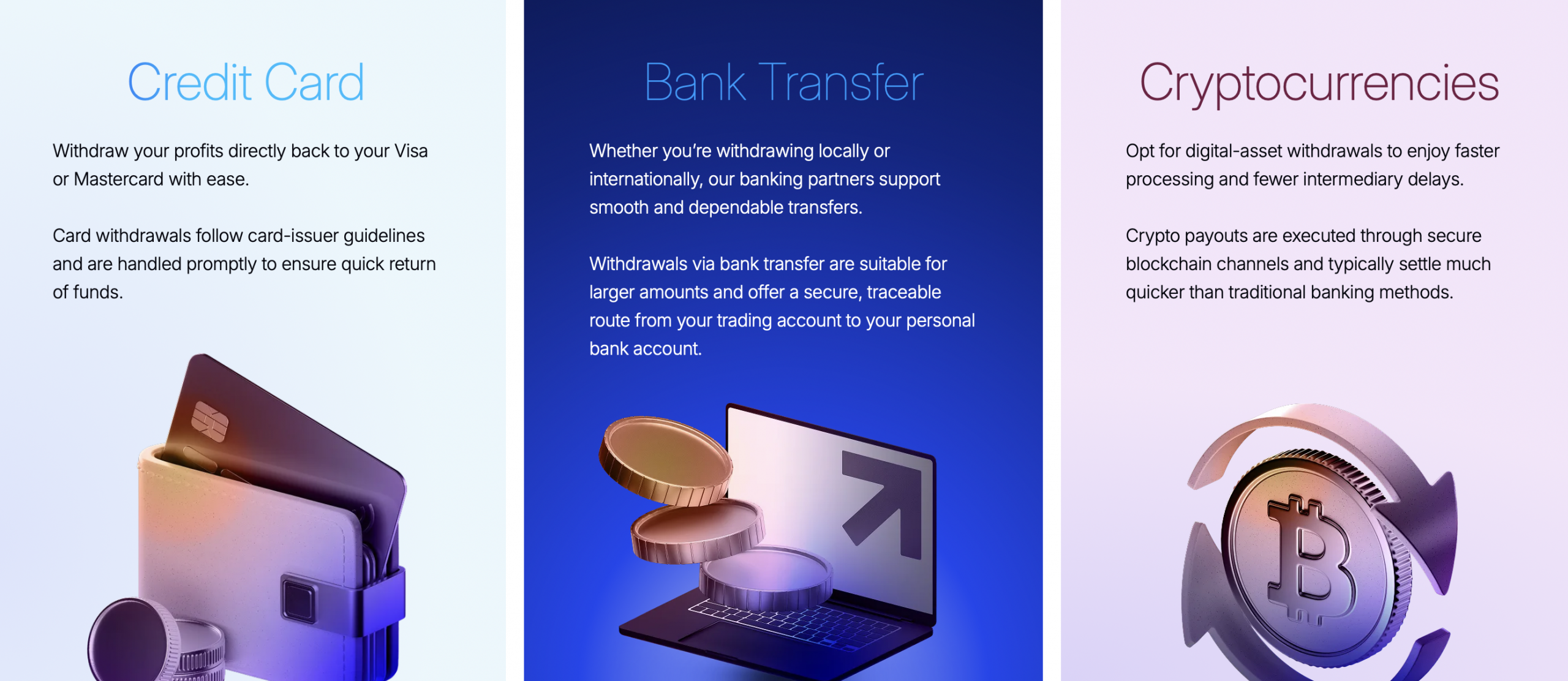
FP Trading does not charge a deposit or withdrawal fee, and any fees may be incurred on the payment provider’s side. Banks, card providers, blockchain networks, or currency conversion can add charges outside the broker’s control. That means the real cost of moving money depends more on the payment method and account currency than on FP Trading.
Is FP Trading Suitable for Low Cost Trading?
Yes, FP Trading is a suitable low-cost broker because of its trading fee structure. The raw account offers low spreads from 0.0 pips with a commission of $3 per side, and the standard account uses spreads from 1.0 pips with no commission. That lets traders choose the option that costs them the least. Furthermore, the broker keeps the initial cost accessible, with a $100 minimum opening balance and support for a 0.01 lot minimum trading size.
Which Account Types Are Available With FP Trading?
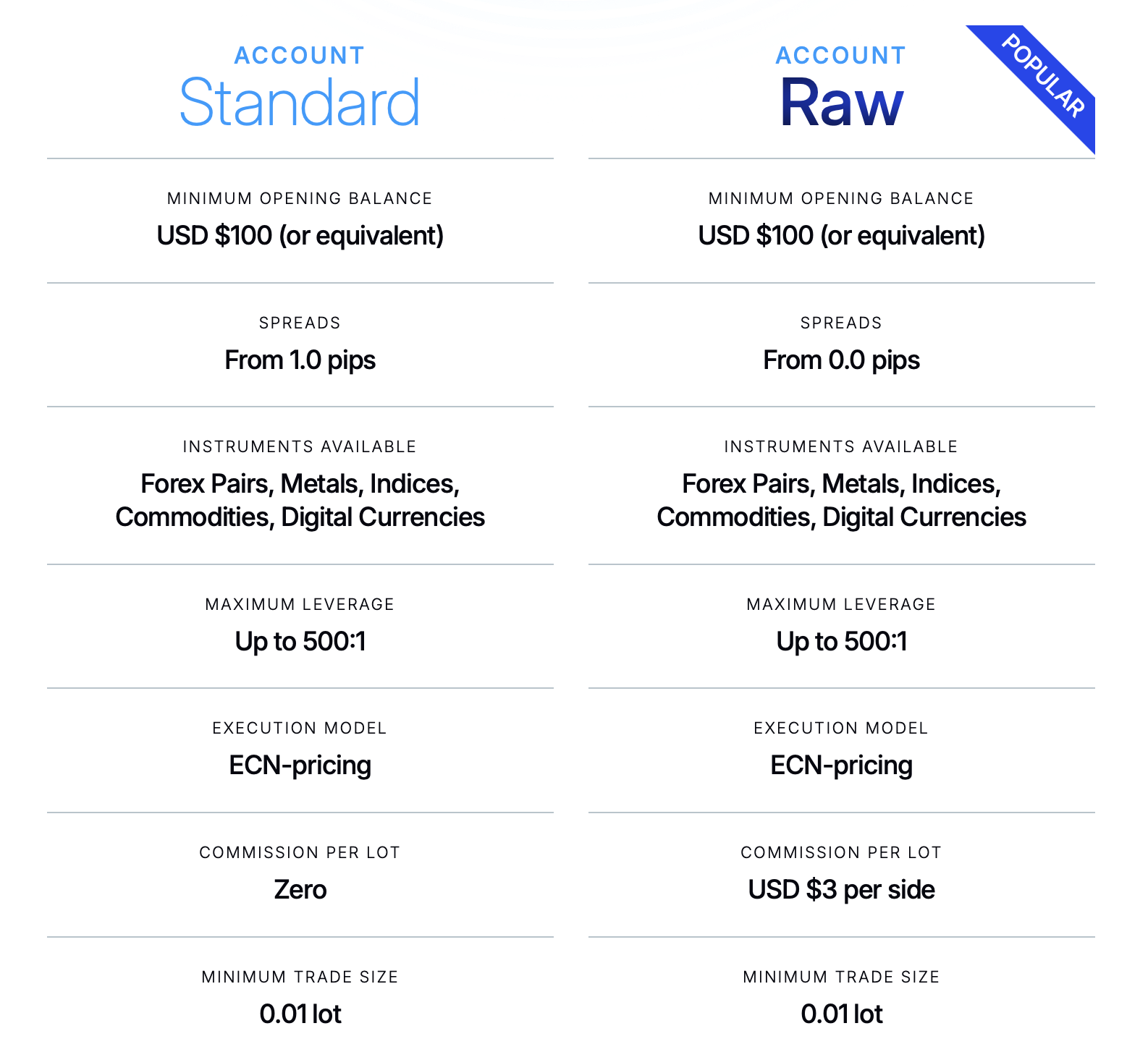
FP Trading offers 4 main account options: standard, raw, demo, and Islamic, with the Islamic account split into Islamic standard and Islamic raw. The choice is straightforward if you have a trading plan, as once you look at the pricing, the main differences come down to spread structure, commission, and the need for swap-free trading.
| Account Type | Minimum Deposit | Spread | Commission | Max Leverage | Minimum Trade Size | Best For |
|---|---|---|---|---|---|---|
| Standard | $100 | From 1.0 pips | $0 | 500:1 | 0.01 lot | Traders who want simple spread-based pricing |
| Raw | $100 | From 0.0 pips | $3 per side | 500:1 | 0.01 lot | Active traders who want tighter spreads |
| Demo | No deposit needed | Simulated based on account type | Simulated based on account type | 500:1 | 0.01 lot | Practice, strategy, and platform testing |
| Islamic Standard | $100 | From 1.0 pips | $0 | 500:1 | 0.01 lot | Swap free trading with spread-based pricing |
| Islamic Raw | $100 | From 0.0 pips | $3 per 100,000 | 500:1 | 0.01 lot | Swap free trading with tighter spreads |
1. Standard
The standard account is the simpler of the two main live account types, in our opinion. It starts at $100 or the equivalent, uses spreads from 1.0 pips, and does not charge a trading commission, so the cost is built into the spread. That makes it the easier option for traders who want simple pricing without having to calculate a separate fee on every trade.
The account still includes the main features most traders expect, such as ECN pricing, leverage up to 500:1, a 0.01 lot minimum trade size, support for Expert Advisors, mobile app access, and VPS availability. The standard account suits traders who do not trade at very high frequency and prefer a cleaner cost structure from the start.
2. RAW
The raw account on FP Trading is built for traders who want tighter spreads and are comfortable paying commission for that pricing model. Spreads begin from 0.0 pips, and the broker charges $3 per side. That’s ideal in our experience for short-term traders, scalpers, and other more active users because spread costs matter more when positions are opened and closed frequently.
This account type also offers up to 500:1 leverage, a 0.01 lot minimum trade size, ECN pricing, Expert Advisor support, mobile access, and VPS availability. The main point is that the raw account offers traders a lower-spread entry, but whether this account type is for you depends on your trade frequency, since commission is part of the total cost.
3. Demo
The demo account is available for traders who want to practice before using real money. It allows users to test the platform, place trades, and become familiar with order entry and account management without risking capital. That makes it the safest starting point for beginners and a useful testing space for experienced traders who want to check a strategy or get comfortable with the platform first.
Another reason the demo is useful is that it lets traders compare the broker’s platforms before choosing a live setup. Traders can test MT4, MT5, cTrader, or TradingView, get used to the layout, and see how the platform handles charts and execution. That reduces mistakes later because the learning happens before real money is involved.
4. Islamic Account Option
FP Trading offers Islamic standard and Islamic raw accounts for traders who need swap-free trading. These accounts are designed to avoid overnight swap charges, which is the primary requirement for traders seeking a Sharia-compliant trading structure. The Islamic standard account offers spreads from 1.0 pips with zero commission, and the Islamic raw account offers spreads from 0.0 pips with a commission of $3 per 100,000.
However, Islamic traders should know that swap-free does not mean cost-free. FP Trading charges administration fees on positions rather than overnight swaps, and those fees vary by symbol and grace period. Pairs such as NZD/USD have an admin fee of $2 per lot per night, GBP/USD $3, EUR/USD $6, and XAU/USD $50.
To open an Islamic account, the trader first opens an MT4 or MT5 account, then requests a conversion via email after the onboarding team reviews the request and may ask for additional documentation.
How to Deposit Money on Your FP Trading Account
To deposit money to your FP Trading account, go to the funding tab and select “Deposit”. Then choose the trading account, pick the payment method, and follow the on-screen instructions. The available options are credit or debit cards, Apple Pay, Google Pay, Bank Wire, Virtual IBAN, crypto, and alternative payment methods.
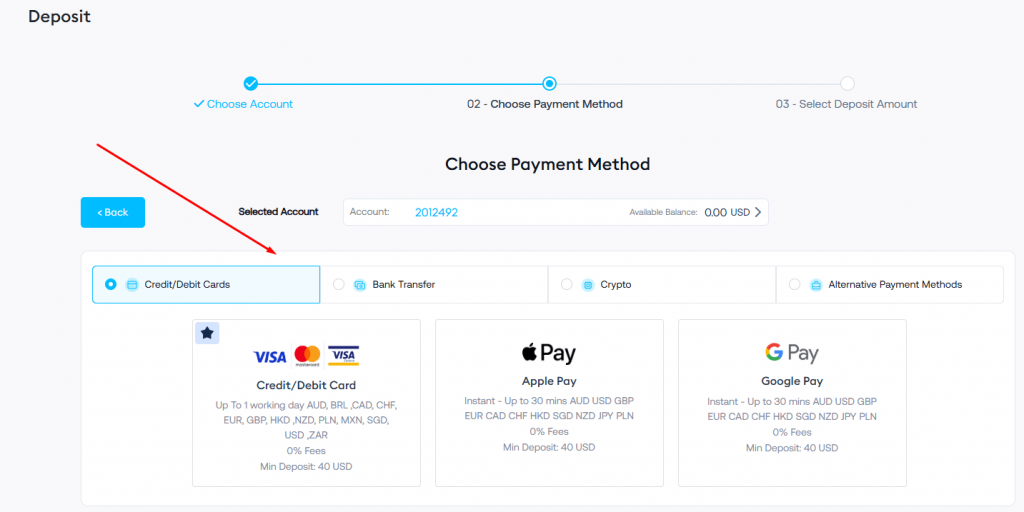
The minimum deposit for account opening is $100, and recurring deposits start at $20. Each option has different minimums with no deposit fee set by FP Trading:
- $20 for Bank Wire, Virtual IBAN, and crypto
- $40 for cards, Apple Pay, and Google Pay
How to Withdraw Money From Your FP Trading Account
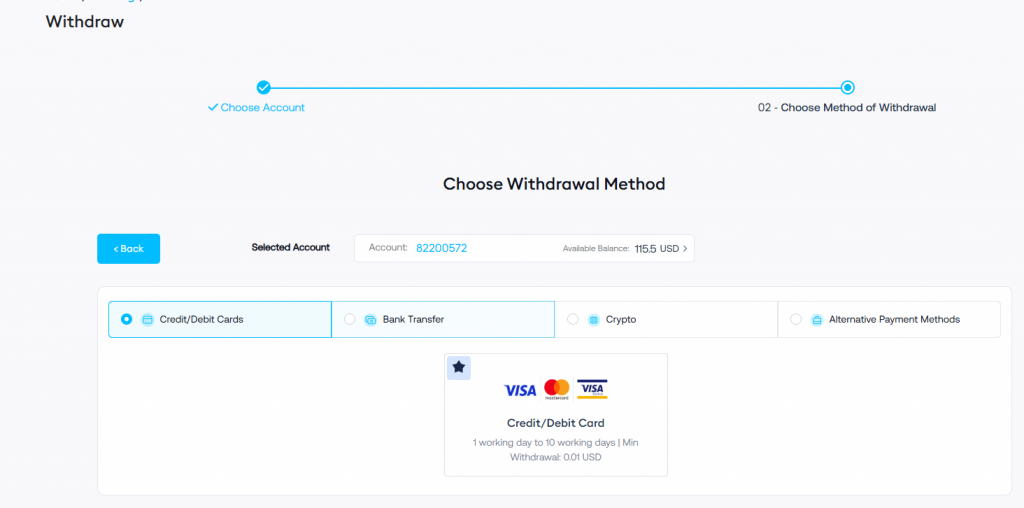
Withdrawing money from FP Trading is in the funding section, through the “Withdraw” tab. Choose the trading account first and then select the withdrawal method. The available options are credit or debit cards, bank transfer, crypto, and alternative payment methods. We found that FP Trading states that funds must be returned through the same method used for the deposit.
The withdrawal time depends on the method; in our experience, withdrawing $100 via credit/debit cards and bank withdrawals takes 1 to 10 working days, while crypto transfers take only 1 day. Also, third-party payments are not accepted, so the payment method must be in the trader’s own name, and that is one of the main reasons a withdrawal can fail. Other common reasons include entering the wrong account details and using a method that does not match the original deposit route.
Does FP Trading Offer a Negative Balance Protection?
Yes, FP Trading offers negative balance protection. This means losses are limited to the money held in your account, so the balance will not fall below zero after extreme market moves. That protection is necessary on a leveraged platform because rapid price swings can create losses that exceed the original deposit.
Which Customer Support Is Offered by FP Trading Account?
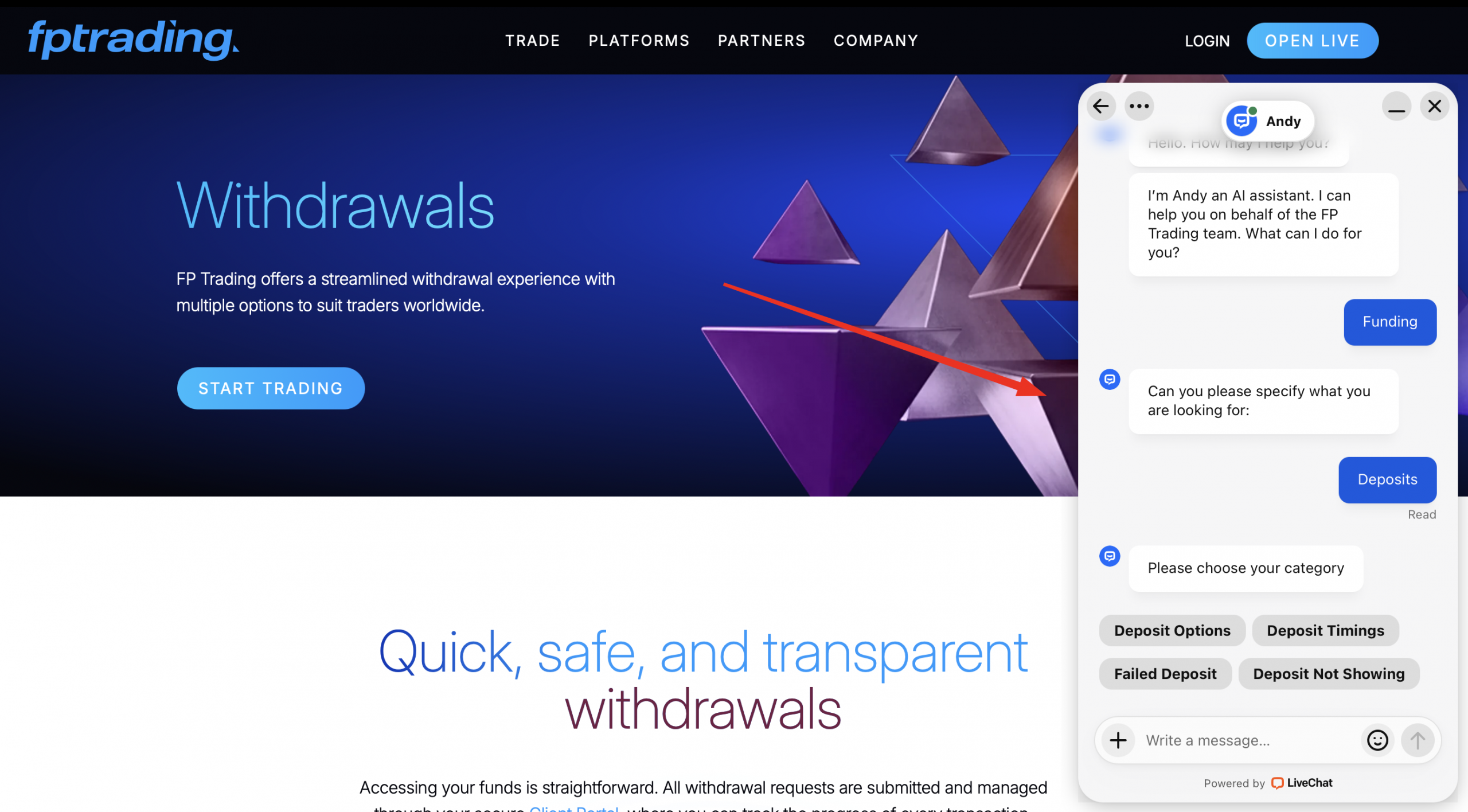
FP Trading offers 24/7 multilingual customer support through phone, email, and live chat. The broker has a detailed FAQ section for common questions about account opening, funding, platforms, instruments, and company information. We liked that the support setup is broad enough to handle quick questions and direct account-related issues, which is what most traders need.
| Support Option | How to Contact | Best For |
|---|---|---|
| Live Chat | Start a live conversation on the FP Trading website in the bottom right corner | Fast help with urgent account or platform questions |
| Email Support | support@fptrading.com | Detailed questions that need documents or a written reply |
| Phone Support | +441224076115 | Direct contact when you want to speak to support immediately |
| FAQ Section | At the bottom of the FP Trading site, under the “Company” section | Quick answers about account opening, funding, platforms, and instruments. |
Do You Need to Pay Taxes on FP Trading Account?
Yes, profits from FP Trading are taxable and likely treated as capital gains or trading income under your local tax rules. The exact tax treatment depends on your country, your tax status, and how your local authority classifies the profits you make from trading. That’s why the responsibility is with the trader, not the broker, because each person has to report and pay taxes under the rules that apply in their own jurisdiction.
Does FP Trading offer a Partner Program?
Yes, FP Trading offers a partner program with different options: Introducing Broker, Affiliate, and Hybrid Partnership. This means you can earn by referring clients and getting paid through ongoing trading activity, CPA-style referrals, or a mix of both. The introducing broker model suits partners who bring in active traders over time, the affiliate model is better for partners who want fixed conversion-based payouts, and the hybrid model combines both structures in one.
Alternatives to FP Trading: Compare With Other Brokers
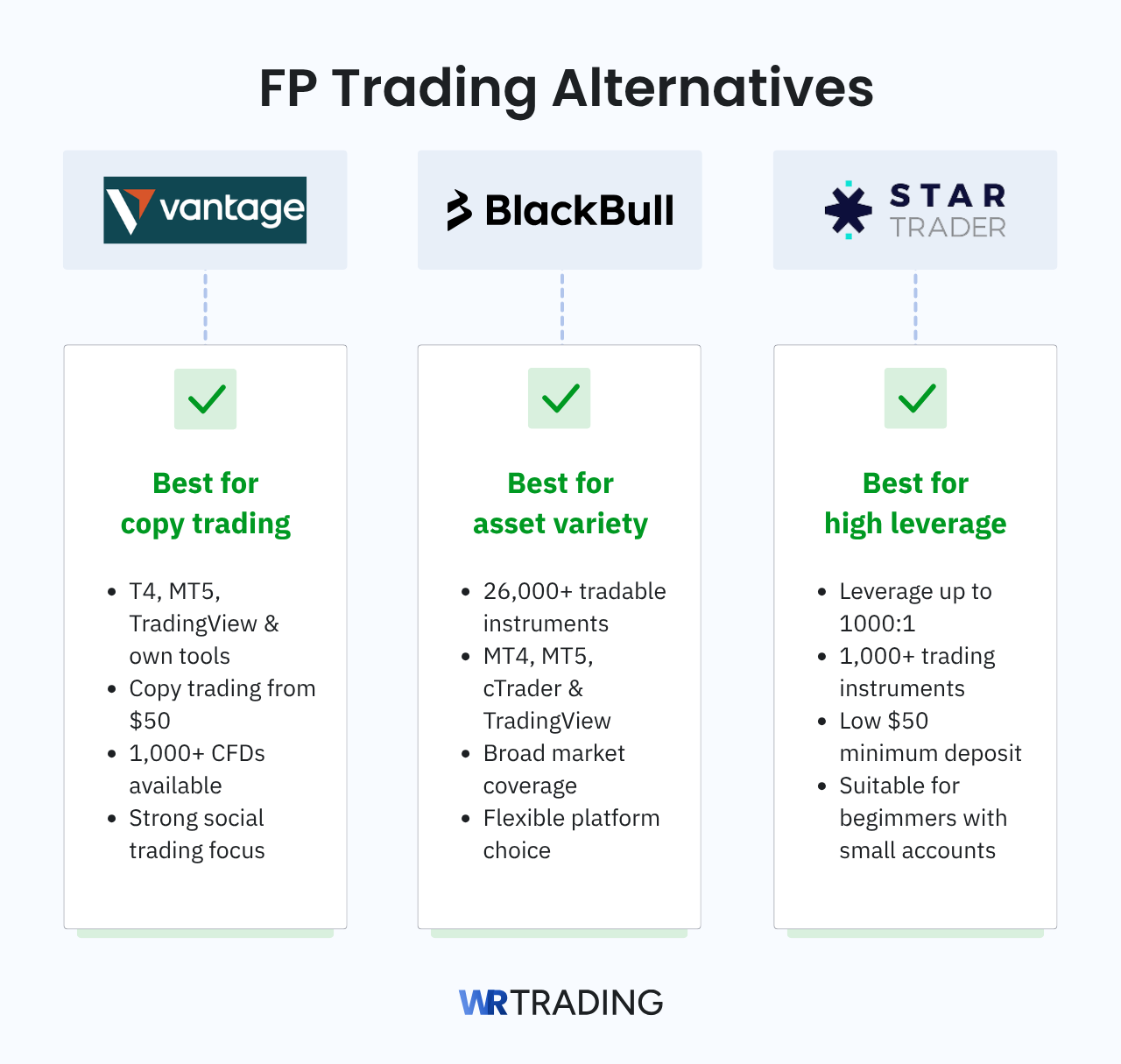
FP Trading is one of our most recommended brokers as it offers a premium CFD trading experience, but it’s not the strongest fit for every trading style. Traders who want more copy-trading features, a broader product range, or a different platform focus may find a better match elsewhere. Three strong alternatives we recommend are Vantage, BlackBull Markets, and StarTrader.
| Broker | Best For | Main Strengths |
|---|---|---|
| Vantage | Traders who want advanced copy trading and access to multiple trading platforms | Supports MT4, MT5, TradingView, and its own platform tools. Copy trading starts at $50, and the broker offers access to over 1,000 CFDs, making it a good alternative for traders who want a more developed social trading offering. |
| BlackBull Markets | Traders who want more instruments and a bigger platform range | Offers over 26,000 tradable instruments and supports MT4, MT5, cTrader, and TradingView, making it a stronger choice for traders who prioritize product range and platform flexibility. |
| StarTrader | Traders who want higher leverage | Provides over 1,000 trading instruments, a $50 minimum initial deposit, and leverage up to 1000:1, making it more appealing to traders who want a smaller entry point with greater buying power. |
Learn to Trade Successfully on FP Trading With the WR Trading Mentoring
FP Trading gives you the platforms, pricing, and market access, but results still depend on your trading skills. WR Trading Mentoring is built around improving trade outcomes, with a focus on high-risk-to-reward setups, strategy development, and more precise execution, backed by more than 15 years of trading experience. That’s important on FP Trading because strong platform features only help when the trader knows how to use them properly.
We offer personalized coaching, real-time market analysis, and one-on-one mentoring, all of which help traders become more profitable long term. If you want to improve your results on FP Trading, WR Trading can help you build that progress with a method that only requires 1 to 3 hours a day.
Conclusion: FP Trading Is a Strong Choice for Active CFD Traders
In conclusion, we recommend and rate FP Trading 5/5 stars for traders who want a broker with a good platform, competitive pricing, and a high leverage of 500:1. What we liked most was the access to MT4, MT5, cTrader, and TradingView, which makes the broker more practical for traders who already have a preferred setup.
Furthermore, we liked the choice between the standard and raw accounts, the low starting deposit of $100, the multiple funding methods, and extra features, such as copy trading, VPS, and FP Trading AI, which gives the broker more depth than a basic CFD platform.
The main reason we do not rate it as “the best of the best” is the regulatory side, as it does not have the same level of oversight as brokers licensed by stronger top-tier authorities. However, our experience with FP Trading is positive, and we would still rate FP Trading 5 out of 5 stars in our trust score.
FAQ: Most Asked Questions on FP Trading
Does FP Trading Support TradingView?
Yes, FP Trading supports TradingView for traders who prefer that charting interface. This is a strong benefit because traders do not need to learn a new interface and can use their familiar setups from the start. Also, it can make the transition from another broker easier, and initializing TradingView is straightforward on FP Trading.
Does FP Trading Support Automated Trading?
Yes, FP Trading supports automated trading via platforms such as MetaTrader 4 and MetaTrader 5. Traders can install Expert Advisors to automate entry and exit points, as well as risk settings, based on their own strategy rules. That makes FP Trading, in our opinion, a great choice for users who rely on algorithmic trading instead of manual execution.
Does FP Trading Offer Copy Trading?
Yes, FP Trading offers copy trading for users who want to follow other traders rather than build their own strategy from scratch. Copy trading can save time during the learning stage, but results depend on the risk level and consistency of the trader being followed. FP Trading provides rankings of each trader, making it easier to select the best person for your risk tolerance.
How Many Markets Can You Access With FP Trading?
FP Trading offers over 1,000 assets in a wide range of markets, including forex, commodities, metals, shares, crypto, and indices. That wider product range makes it easier to build a diversified trading plan within a single broker account. Traders who like switching between market types may find FP Trading more convenient than using a broker with a narrower range of offerings.
Does FP Trading Offer Trading Tools Beyond Basic Charting?
Yes, alongside technical indicators and platform-based tools, the broker provides FP Trading AI, which reviews your trading behavior and performance to show where your decision-making may be slipping. This adds more practical value than most brokers do, as you get personalized analysis that can help spot habits such as overtrading, poor risk control, or inconsistent position sizing.

